You've watched the tutorials, read the guides, and opened a funnel builder. Three hours later you've built nothing usable and you're more confused than when you started.
Setting up a marketing funnel isn't inherently complicated. It only feels that way because most platforms teach you the tool before they teach you the funnel.
👉 Build a working funnel without the confusion here
Why This Complexity Problem Happens
Most funnel tutorials start with the interface. They explain where the buttons are, how to add sections, and how to configure settings. What they don't explain is what a funnel actually is and why each piece exists.
Without that mental model, every step feels arbitrary. You're clicking buttons without understanding what you're trying to accomplish.
The root issue is teaching order. A funnel is a sequence of three questions: how do I get attention, how do I capture interest, and how do I convert it into a sale. When you understand that sequence first, the tools become obvious. When you start with the tools, the sequence stays invisible.
Step-by-Step Fix for Setting Up a Funnel Without the Overwhelm
Step 1: Strip the Funnel Down to Three Pages
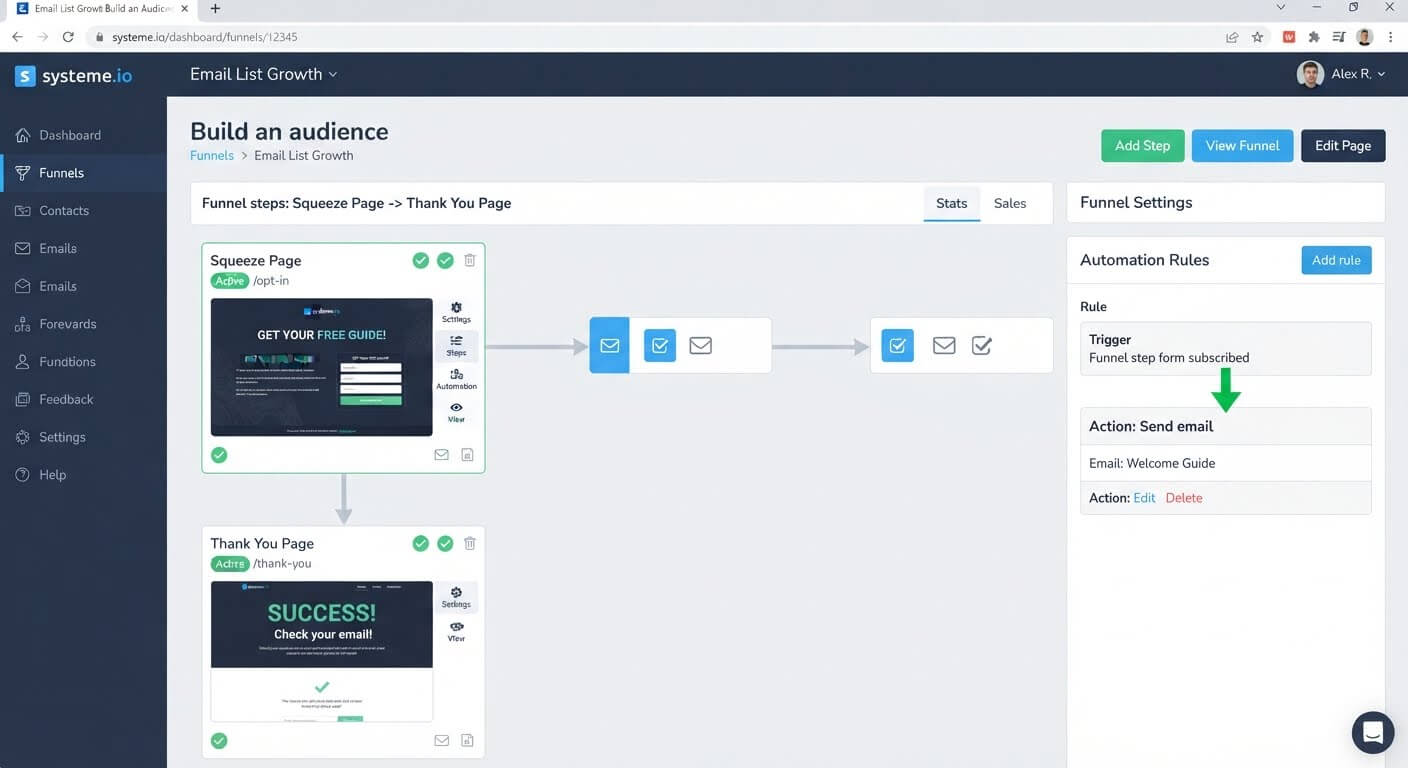
Forget upsells, downsells, order bumps, and multi-step sequences. A working funnel needs exactly three things:
- An opt-in page where visitors give you their email
- A thank-you page where they get what they were promised
- A follow-up email that continues the conversation
That's it. Everything else is an enhancement, not a requirement.
Step 2: Choose One Goal for the Whole Funnel
Before you build anything, decide what the funnel is for. Two options cover most beginners:
- Collect leads in exchange for a free resource
- Sell one product directly
Pick one. A funnel that tries to collect leads and sell three products at the same time becomes a maze for both you and the visitor.
Step 3: Use a Template Instead of a Blank Canvas
A blank funnel builder is where most beginners freeze. There's no structure, no starting point, and no guidance.
Systeme.io provides pre-built funnel templates**. When you create a funnel, you choose a type—opt-in, product sale, webinar—and the pages are already laid out. Your job becomes swapping text, not designing from scratch.
Step 4: Write the Headline and Opt-In Copy First
Before you touch colors or fonts, write the words. The headline states what the visitor gets. The subheadline expands on it. The form asks for the email.
If the words don't work, no amount of design will fix it. If the words work, the design just needs to be clean.
Step 5: Connect One Email Sequence
Your funnel needs one automation: when someone submits the form, send them an email. That's the minimum viable automation.
In Systeme.io, create a rule with the trigger "Funnel step form subscribed" and the action "Send email." Write a short delivery email. Save it. The funnel now works.
Step 6: Test It Before You Make It Prettier
Submit your own form with a real email address. Confirm that:
- The thank-you page loads
- The delivery email arrives
- Your contact appears in the CRM
Fix any broken links or missing emails before adjusting design.
👉 Start building with a pre-built funnel template for free here
The Easiest Way to Avoid This Issue Moving Forward
The simplest way to keep funnel-building from becoming complicated is to choose a platform that guides the process instead of handing you a blank canvas.
Systeme.io's funnel builder starts with a goal and a template, not a blank page. You select "Build an audience" or "Sell a product," and the pages are already connected. The editor uses drag-and-drop blocks with no coding required.
The free plan includes three funnels, 2,000 contacts, and unlimited email sends. That's enough to build a working opt-in funnel, test it, and make your first sales without paying anything.
If you outgrow the free limits, the Startup plan is $17 per month for 5,000 contacts and five funnels.
Common Mistakes to Avoid
Starting with a Blank Funnel Builder
A blank canvas is the fastest way to freeze. Start with a template that already has the structure.
Building Five Pages Before Testing One
Build the opt-in page, test it, then add the thank-you page. Test each step as you build it, not after the whole funnel is done.
Trying to Add Upsells Before the First Sale
Upsells and downsells only make sense once the core funnel works. Start simple, then add complexity only when your funnel is already converting.
Skipping the Email Connection
A funnel that collects emails but never sends anything is a dead end. Connect at least one email before you drive traffic.
Copying an Advanced Funnel Tutorial
Advanced funnel tutorials assume you already understand the basics. Start with a simple structure, then work your way up.
Frequently Asked Questions
Why does building a funnel feel so hard?
Most tutorials teach the tool before the concept. If you don't understand what a funnel is supposed to accomplish, every button feels arbitrary. Start with the three-page structure first, then learn the platform.
Do I need multiple pages for a funnel to work?
No. A working funnel can be two pages (opt-in and thank-you) plus one email. Everything beyond that is optional.
How long does it take to set up a simple funnel?
With a template, most beginners can publish a two-page funnel in under two hours. The copywriting takes longer than the building.
Can I build a funnel without design experience?
Yes. Templates and drag-and-drop editors remove the design work. You swap text and images, and the layout handles itself.
Do I need to learn automation before building a funnel?
No. One automation rule—trigger on form submission, send one email—is enough to make a funnel work. More complex automation can come later.
Conclusion
Setting up a marketing funnel feels complicated because most people learn the tool before they learn the funnel. The fix is to reverse that order.
Start with three pages: opt-in, thank-you, and follow-up email. Choose one goal. Use a template instead of a blank canvas. Write the words before you touch the design. Connect one email. Test it.
Systeme.io's free plan gives you the templates, the page builder, and the email automation in one account. You don't need to learn five tools to build one funnel.
Your first funnel doesn't need to be impressive. It needs to work.
👉 Build your first funnel without the confusion today
Related Reading
Breaking through the confusion of early web optimization opens up massive business leverage. To skip the tech overwhelm and build clean systems completely on your own, read my actionable guide on How to Automate My Small Business Backend Without Hiring Tech Support.