Every hour you spend manually adding contacts, sending invoices, or copying data between tools is an hour you're not spending on the work that actually grows your business. Automating the backend doesn't require hiring a developer—it requires the right platform and a few clear rules.
Here's how to automate the repetitive parts without tech support, extra subscriptions, or coding.
👉 Automate your business backend for free here
Why This Backend Problem Happens
Most small business owners build their backend one tool at a time. Email lives in one app. Payments live in another. Customer records live in a spreadsheet or a CRM that doesn't talk to either of them.
Each task works on its own, but none of them connect. When someone fills out a form, you manually add them to the email list. When they buy, you manually tag them. When they don't, you manually follow up.
The root issue is that backend tasks share the same data, but your tools don't. Every duplicate action creates room for human error and wastes time. Automation works when a single event—like a purchase or a form submission—can trigger multiple actions at once.
Step-by-Step Fix for Automating Your Backend
Step 1: List the Repetitive Tasks You Do Weekly
Write down everything you do on autopilot: adding new contacts, sending welcome emails, tagging buyers, sending invoices, following up on abandoned carts.
Sort them into two lists. Tasks that depend on an event—a purchase, a form submission, a tag being applied. Tasks that are truly manual—bookkeeping, inventory checks, email replies.
The first list is what you're about to automate.
Step 2: Choose a Platform Where Data Lives Together
Automation requires your email, contacts, and checkout to share the same database. If they're in separate tools, you need a connector like Zapier, which adds cost and fragility.
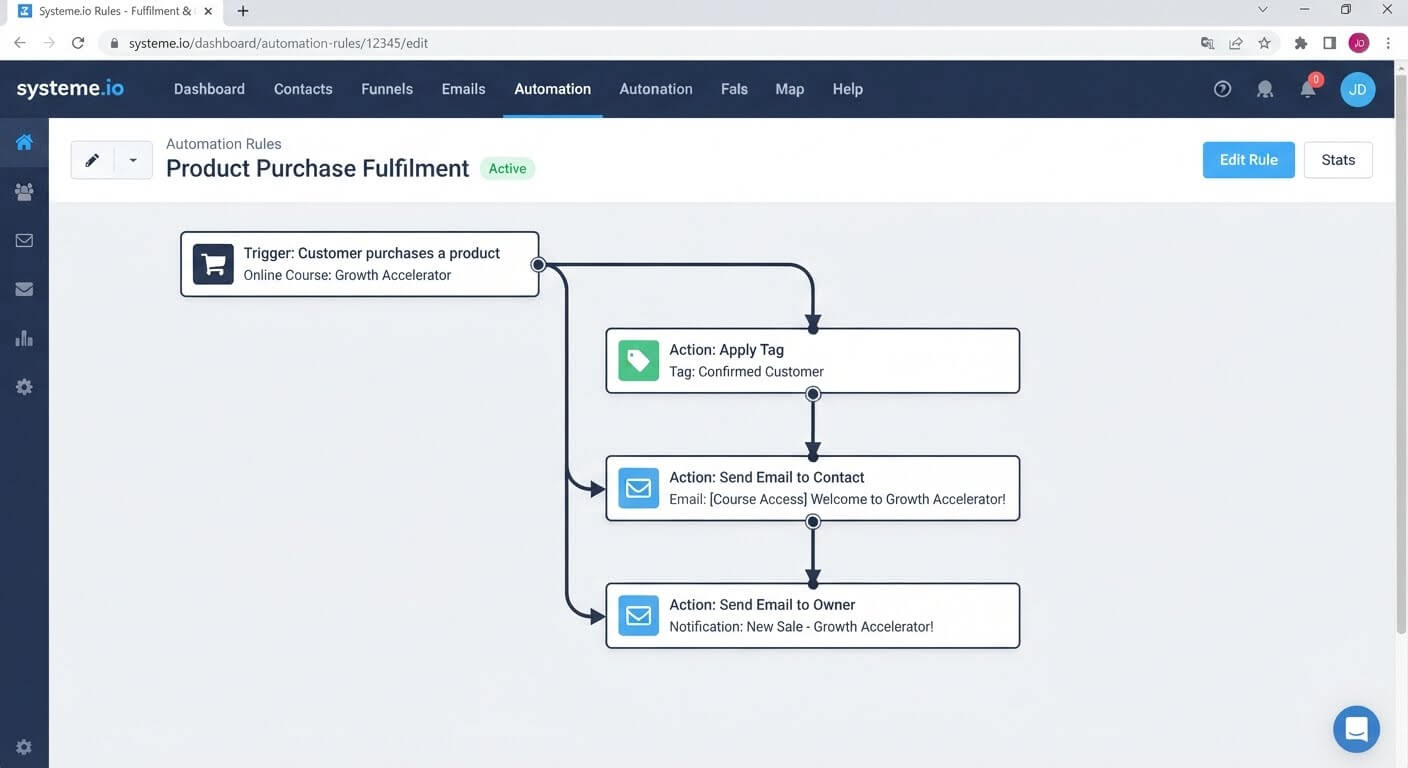
Systeme.io keeps all three in one account. A purchase creates a contact, applies a tag, and triggers an email—all from the same rule.
Step 3: Automate New Contact Onboarding
Create an automation rule with the trigger "Funnel step form subscribed" and the action "Send email."
Write a short welcome email that confirms the subscription and delivers any promised resource. Save the rule.
Now every new subscriber gets a welcome email automatically, whether you're at your desk or asleep.
Step 4: Automate Purchase Follow-Up
Create a second rule with the trigger "Customer purchases a product". Add two actions: "Send email" with the delivery message, and "Apply tag" with a buyer label.
This ensures buyers get what they paid for immediately, and their contact record reflects the purchase.
Step 5: Automate Follow-Up Sequences
Create a rule triggered by a tag. When someone gets tagged "lead", send the first email of a three-part nurture sequence.
Add a delay action between each email—two days is a reasonable start. The sequence runs itself.
Step 6: Automate Notification Emails to Yourself
Some automation isn't for customers. When a purchase comes in, you want to know.
Use the action "Send email to a specific email address" and enter your own address. Add this action to the purchase trigger so you receive a notification whenever a sale happens.
Step 7: Test Each Rule Individually
Don't activate all rules at once. Test one at a time. Trigger the event, confirm the email arrives, and check the CRM for the correct contact record.
Fix any missing emails or wrong tags before moving to the next rule.
👉 Build your first backend automation in one free account here
The Easiest Way to Avoid This Issue Moving Forward
The simplest safeguard against backend chaos is to use one platform that shares data across email, contacts, and checkout.
Systeme.io's free plan includes 2,000 contacts, unlimited email sends, and automation rules that connect form submissions, purchases, and tags to email actions. You can build a working backend flow without a developer, Zapier, or a second subscription.
The limit worth knowing: the free plan includes one automation rule, so you can automate a single flow. For multiple rules covering onboarding, purchases, and nurture sequences, the Startup plan is $17 per month for 5,000 contacts and additional automation capacity.
For a small business just starting to automate, one rule that handles the most repetitive task is a meaningful start. Add more rules as your backend needs grow.
Common Mistakes to Avoid
Automating Before You Understand the Manual Process
If you don't know the steps a task involves, you can't automate them correctly. Map the process on paper first.
Activating All Rules at Once
Multiple rules running simultaneously make it impossible to know which one failed. Test one rule at a time.
Forgetting to Save the Email
A rule won't send an email that hasn't been saved in the editor. Save the email first, then save the rule.
Relying on Zapier for a Simple Connection
If your email, contacts, and checkout live in one platform, you don't need Zapier. Paying for a connector adds cost and a point of failure.
Automating Tasks That Need Judgment
Not everything should be automated. Customer replies, refund decisions, and sensitive communication still need a human. Automate the repetitive tasks, not the thoughtful ones.
Frequently Asked Questions
Can I automate my backend without hiring tech support?
Yes. Most backend tasks—welcome emails, purchase follow-ups, tagging—can be automated with a visual rule builder that requires no coding.
Do I need Zapier to automate email and checkout?
No, if your email and checkout live in the same platform. Zapier is only needed when tools are separate products that can't talk to each other.
What if I need more than one automation rule?
Systeme.io's free plan includes one rule. Additional rules require the Startup plan at $17 per month for 5,000 contacts and expanded automation capacity.
Can I automate notifications to myself?
Yes. Use the "Send email to a specific email address" action and enter your own address. This sends you a notification whenever the trigger fires.
Is automation safe for customer-facing tasks?
For routine communication like welcome emails and delivery confirmations, yes. For sensitive messages like refund discussions, keep a human in the loop.
Conclusion
Automating your business backend doesn't require a developer or a monthly retainer. It requires a platform where the data already lives in one place and a few rules connecting events to actions.
Start with your most repetitive task. Build one rule. Test it. Then build the next.
Systeme.io covers the essentials—form triggers, purchase triggers, tag-based sequences, and notification emails—on its free plan. You can automate the backend without adding another subscription.
Your time is better spent growing the business than copying data between tools.
👉 Start automating your backend for free today
Related Reading
Taking control of your digital infrastructure protects your margins and saves you from third-party agency bills. If you are still trying to figure out why standard industry setups feel so overwhelming, review my diagnostic breakdown addressing Why Is Setting Up a Marketing Funnel So Complicated?.