Zapier breaking between your form and email means every new lead silently disappears until you notice the gap. The fix isn't another workaround—it's removing the fragile middleman entirely.
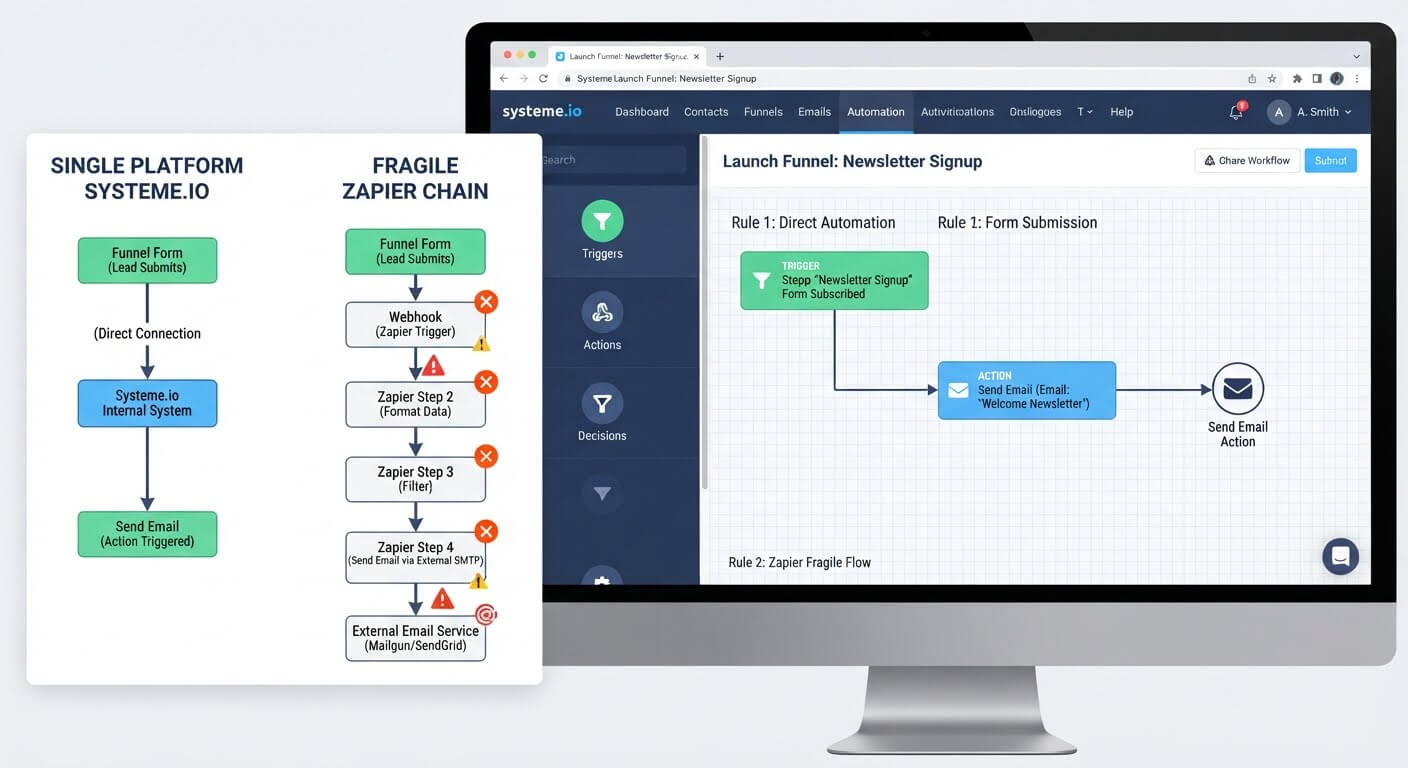
Systeme.io eliminates this failure point by building forms and email automation into the same platform, so a submission triggers the email directly with no third-party connector to break.
👉 Connect your form to email automation without Zapier here
Why This Error Happens
Zapier sits between two separate apps, and every connection in that chain can fail. The form app might stop sending webhooks, Zapier might auto-disable the Zap after repeated errors, or the app connection might expire .
One of the most common triggers is Zapier's automatic shutdown. If a Zap errors 95% of the time it runs and has run more than 20 times in the past 7 days, Zapier turns it off entirely . You don't get a warning—the integration just stops working.
The root issue is that a form-to-email workflow depends on two external apps plus Zapier itself. Any of those three can change an API, revoke a token, or rename a field, and the whole chain collapses. The more tools you stack, the more points of failure you create.
Step-by-Step Fix for the Zapier Break
Step 1: Check Whether the Zap Has Been Turned Off
Open your Zapier dashboard and look at the Zap's status. If it shows "Off," it was likely disabled automatically after repeated errors .
Click into the Zap history to see the specific error message. Zapier logs the HTTP status code and the app that caused the failure .
Step 2: Reconnect the Expired App Connection
If the error is a 401 Unauthorized, your app connection has expired or been revoked. This happens when you change a password in the connected app or when the app enforces a session timeout .
Go to Zapier's App Connections page, find the app with the expired icon, and click Reconnect . Then test the Zap with a fresh form submission.
Step 3: Verify the Form Is Still Sending Webhooks
If the Zap isn't triggering at all, the form app may have stopped sending data. Check the webhook URL in your Zap matches the one in your form settings .
Test by submitting the form yourself and immediately checking Zapier's Test trigger. For instant triggers, you must test right after the event—delays can cause Zapier to miss it .
Step 4: Remap Fields That Have Changed
If the Zap runs but the email arrives blank, the field mapping has broken. Zapier only transfers data that's explicitly mapped from the trigger step to the action step .
Open the Zap editor and check for fields with a yellow warning icon. This means the field no longer exists or was renamed in the source app. Re-select the correct field and republish the Zap .
Step 5: Replace the Fragile Chain
Even after fixing the current break, the same failure will happen again. Zapier adds a third dependency between your form and your email tool, and any update to either app can break the connection.
The durable fix is to stop separating the two. Systeme.io includes forms and email automation in the same account. A form submission triggers an automation rule directly—no webhook, no third-party connector, no Zap to break.
👉 Build a form-to-email flow that doesn't rely on Zapier here
The Easiest Way to Avoid This Issue Moving Forward
The simplest way to stop Zapier breaks is to remove Zapier from the equation.
Systeme.io's free plan includes landing pages with forms, email campaigns, and automation rules in one dashboard. When someone submits your form, they become a contact and your automation fires immediately . There's no webhook to configure, no app connection to expire, and no Zap that can auto-disable.
If you're already using Systeme.io for email, adding a form is just another funnel step. If you're using a different form tool, you can embed a Systeme.io form or migrate the page entirely.
Common Mistakes to Avoid
Ignoring the Zap History Until Leads Go Missing
Zapier doesn't email you every time a Zap errors. Unless you're on a Team or Enterprise plan with the grace period notification, the Zap can turn off silently . Check the history weekly if you're relying on Zapier.
Reconnecting Without Testing
Reconnecting an app fixes the auth issue, but the Zap may still fail if the form fields changed. Always test with a fresh submission after reconnecting.
Assuming the Form Is Always the Problem
Sometimes the email app is the one that broke. The Zap history shows which step errored—read it before guessing .
Staying on Zapier When the Chain Keeps Breaking
If you've fixed the same integration three times, the problem isn't the fix. It's the architecture. A direct connection removes the failure point entirely.
Frequently Asked Questions
Why does Zapier keep turning off my form-to-email Zap?
Zapier automatically disables a Zap if it errors 95% of the time it runs and has run more than 20 times in the past 7 days . The errors are usually caused by expired app connections, changed field names, or the form app failing to send data.
How do I know which app is breaking the Zap?
Open the Zap history, click the failed run, and check the errored step. Zapier shows the HTTP status code and the specific app that returned the error . A 401 means an expired connection. A 400 usually means a missing or renamed field.
Can I connect a form to email without Zapier?
Yes. Use a platform where forms and email automation are built together. Systeme.io includes both, so a form submission triggers an automation rule directly without a third-party connector.
Conclusion
A Zapier integration between a form and an email tool is a chain of three dependencies. Any one of them can break—and when it does, your leads disappear silently.
You can reconnect the app, remap the fields, and turn the Zap back on. But the same failure will return the next time an app updates its API or your connection expires.
The durable fix is a direct connection. Systeme.io builds forms and email automation into the same platform, so a submission triggers the email without a webhook or a Zap in between.
If you've fixed the same integration more than once, it's time to remove the middleman.
👉 Connect your form to email automation for free today
Related Reading
Diagnosing webhook errors helps keep your background automated processes active. If you are tired of paying for third-party connector fees and dealing with connection drops, learn How to Connect a Landing Page to Email Automation Without Zapier.