Paying $20 to $30 per month for Zapier just to connect a form to an email sequence is unnecessary. Most landing page builders and email tools can talk to each other directly—or better yet, live inside the same platform.
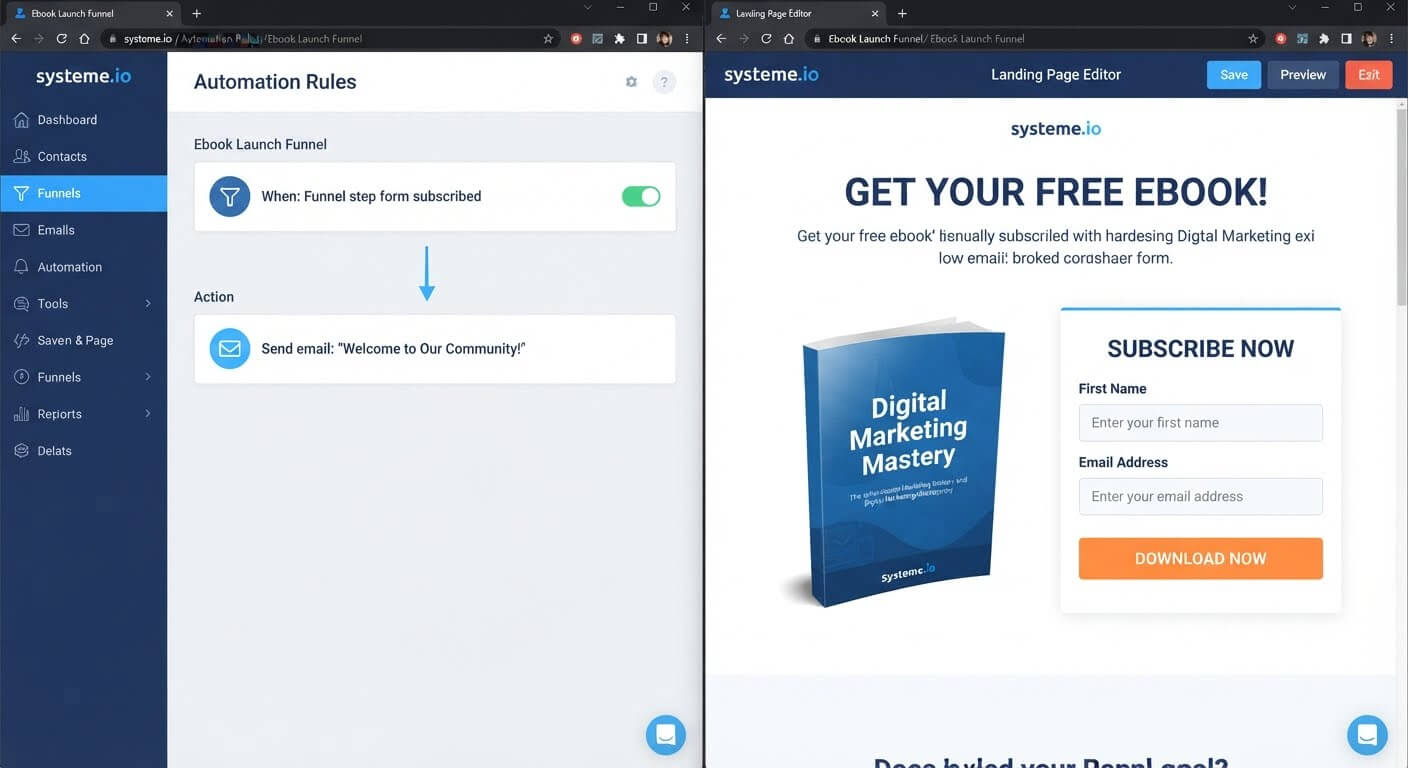
Systeme.io eliminates the integration entirely by bundling landing pages, forms, and email automation in one account. A form submission triggers the email automatically, no third-party connector required.
👉 Connect your landing page to email automation for free here
Why This Cost Problem Happens
Zapier exists because most marketing tools don't talk to each other. Your landing page builder stores form submissions in one place. Your email platform stores contacts in another. Without an integration, the two don't know about each other.
Zapier bridges that gap by watching for a trigger in one app and performing an action in another. It works, but it adds a monthly subscription, a potential point of failure, and a delay between the trigger and the action.
The root issue is fragmentation. When your landing page and email platform are separate products, you need a third product to connect them. Every additional tool adds cost and complexity.
Step-by-Step Fix for Connecting Without Zapier
Step 1: Check Whether Your Email Platform Has Native Form Embedding
Many email platforms provide embeddable forms you can paste into any landing page. When someone submits the form, they're added directly to your email list—no Zapier needed.
Log into your email platform and look for a "Forms" or "Signup Forms" section. If it exists, you can embed that form on your landing page and skip the integration entirely.
Step 2: Use a Webhook If Your Platform Supports It
Some landing page builders let you send form submissions to a webhook URL. Your email platform may accept incoming webhooks that create contacts.
This is more technical than a native integration but avoids the Zapier subscription. Check both platforms' documentation for webhook support.
Step 3: Choose a Platform Where Both Live Together
The simplest fix is to stop separating the two tools. If your landing page builder and email automation are part of the same platform, the connection is automatic.
Systeme.io includes landing pages, forms, email campaigns, and automation rules in one dashboard. When someone submits a form, they're added to your contacts and can trigger an automation immediately .
Step 4: Build the Landing Page and Form
In Systeme.io, create a funnel step for your landing page. Add a form element with an email field and any other information you need.
The form is connected to your contact list by default. Every submission creates a new contact automatically.
Step 5: Set Up the Automation Trigger
Go to the automation builder and create a new rule. Set the trigger to "Funnel step form subscribed" and select the specific form or funnel step.
Then add the action: "Send email." Choose the email you want to send—a welcome message, a lead magnet delivery, or the first email in a nurture sequence.
Step 6: Test the Entire Flow
Submit your own form using a test email address. Confirm that the contact appears in your CRM and that the automation email arrives.
If the email doesn't send, check that the automation rule is active and the trigger matches the correct form.
👉 Build your landing page and automation in one place for free here
The Easiest Way to Avoid This Issue Moving Forward
The simplest way to connect a landing page to email automation is to use a platform where both are built in.
Systeme.io's free plan includes landing pages, forms, email campaigns, and automation rules. When someone submits a form, they become a contact and the automation can fire immediately—no Zapier, no webhook configuration, no monthly integration fee .
The free plan supports 2,000 contacts and unlimited email sends. If you outgrow those limits, the Startup plan is $17 per month—still less than Zapier's Professional tier alone.
For creators who already have a landing page builder they like, native form embedding is the next best option. But if you're starting fresh, choosing an all-in-one platform removes the integration problem before it starts.
Common Mistakes to Avoid
Assuming Every Form Automatically Triggers Automation
In most platforms, a form submission adds a contact but doesn't start an email sequence unless you build an automation rule. Check that the rule exists and is active.
Using a Webhook Without Testing
Webhooks can fail silently if the receiving platform changes its endpoint or requires authentication. Test thoroughly before sending traffic.
Paying for Zapier When Native Embedding Exists
Many email platforms offer embeddable forms that connect directly to your list. Check for this feature before subscribing to an integration tool.
Forgetting to Tag New Contacts
Tags let you segment contacts based on which form they submitted. Without tags, you can't send targeted follow-ups. Systeme.io applies tags automatically when configured in the form settings.
Frequently Asked Questions
Can I connect a landing page to email automation without Zapier?
Yes. The simplest method is using a platform where both tools are built in. Systeme.io includes landing pages, forms, and automation in one account, so no third-party connector is needed .
Does Systeme.io require Zapier for form-to-email automation?
No. Systeme.io's automation builder uses form submissions as triggers directly. You create a rule with the trigger "Funnel step form subscribed" and the action "Send email" .
What if I already have a landing page builder I like?
Check whether your email platform offers embeddable forms. You can paste the form code into your landing page and submissions will go directly to your email list.
Is there a delay between form submission and automation?
On Systeme.io, the automation triggers within seconds of the form submission. Zapier integrations can have delays of several minutes depending on the plan.
Conclusion
Connecting a landing page to email automation doesn't require a $20 to $30 monthly Zapier subscription. The simplest path is choosing a platform where both tools are already connected.
Systeme.io's free plan includes landing pages, forms, email campaigns, and automation rules in one dashboard. A form submission triggers your email sequence immediately, with no third-party tool in between.
If you're already using separate tools, check for native form embedding before paying for an integration. The connection might already be built in.
👉 Connect your landing page to automation for free today
Related Reading
Leveraging native backend triggers eliminates multi-tool friction and completely cuts out extra subscription bills. If you are currently attempting to fix an active multi-step workflow link, check out my troubleshooting breakdown on Why Does My Zapier Integration Keep Breaking Between Form and Email?.