ClickFunnels starts at $97 per month just to access the funnel builder. If you're running a small operation, that fixed cost is hard to justify before you've made a single sale. Switching to Systeme.io removes that monthly barrier—but the migration itself has a few steps that are easy to get wrong.
Here is the exact process, including the free done-for-you migration option most people don't know exists.
👉 Start your ClickFunnels migration with a free account here
Why This Migration Problem Happens
ClickFunnels and Systeme.io organize data differently. ClickFunnels stores funnels, contacts, and automations in its own structure. Systeme.io uses tags and automation rules to connect contacts to courses and sequences.
The root issue is that nothing transfers automatically. ClickFunnels lets you export contacts as a CSV, but your pages, courses, and automations must be rebuilt or migrated manually.
That's where most people get stuck. They export the list, import it, and then realize their entire funnel structure still lives on the old platform.
Step-by-Step Fix for Switching Platforms
Step 1: Check If You Qualify for the Free Migration Service
Systeme.io offers a free done-for-you migration when you subscribe to the Unlimited monthly plan or any annual plan. Their team manually rebuilds your funnels, courses, emails, and automations.
If your asset library is substantial, this is worth taking. A week of your own time rebuilding pages is more expensive than one month on a higher tier.
Step 2: Export Your Contacts from ClickFunnels
Log into ClickFunnels and export your contact list as a CSV file. This is the one piece of data you can transfer directly.
Before importing, clean the list. Remove duplicates and hard bounces. If you can't spot bad addresses manually, run the file through an email verification service.
Step 3: Rebuild Your Funnels (Or Let the Team Do It)
If you're using the free migration service, their specialist recreates your sales funnel pages, including images, videos, audio, titles, and text. They also test the links between pages to ensure the flow works.
If you're migrating yourself, use funnel templates as starting points. Don't build from a blank canvas—templates already have the page structure in place.
Step 4: Migrate Your Courses Manually
Courses are imported individually, including modules, lectures, and quizzes. There is no bulk course import.
If you're doing this yourself, download every video and file from ClickFunnels first. Then rebuild the course structure inside the course builder. Budget a full day for a mid-sized course.
Step 5: Rebuild Your Automations
Every automation—simple or complex—must be recreated in the Automations section, under Rules and Workflows. The platforms function differently, so the rules won't match one-to-one.
Start with your most important automation: the welcome sequence triggered by your main opt-in form. Test it before moving to the next one.
Step 6: Import Contacts and Tag Them
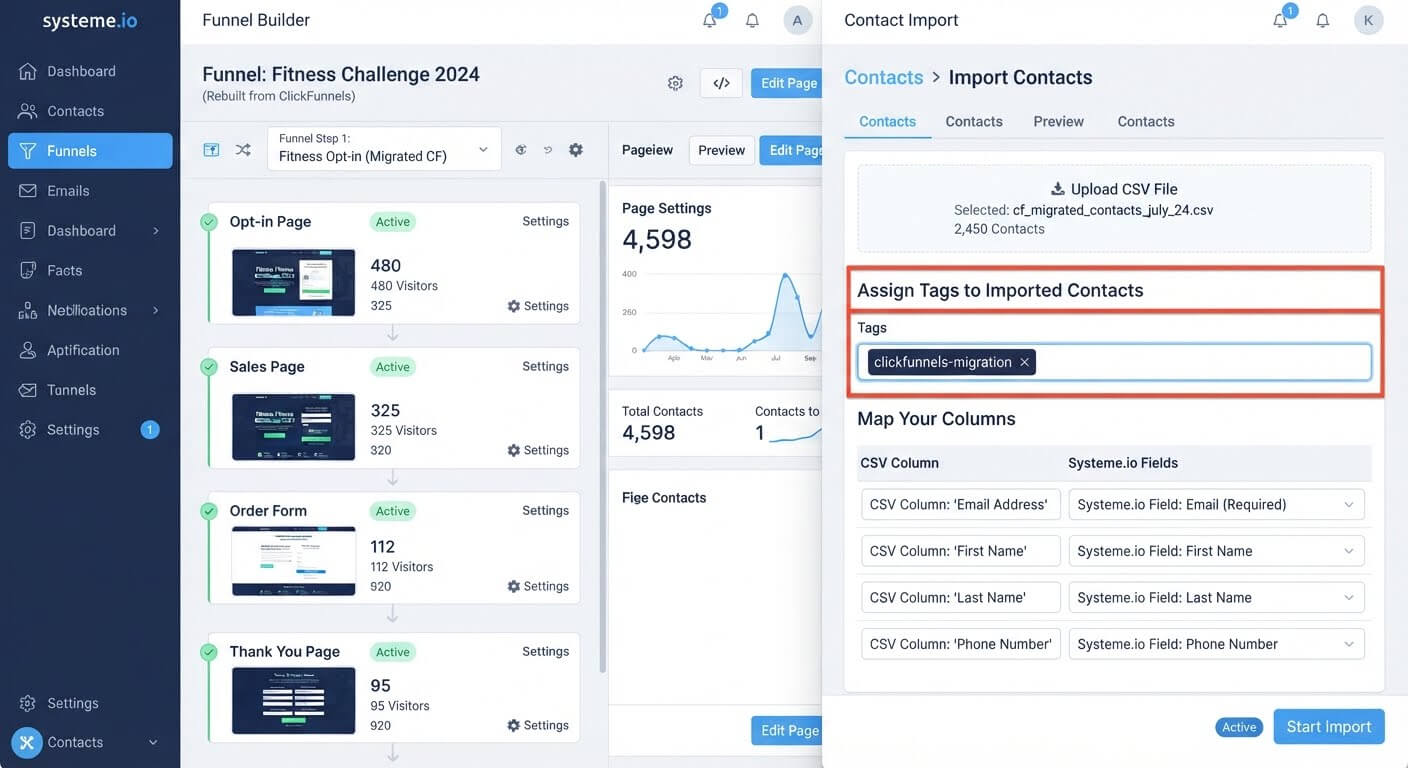
Go to CRM > Contacts and click Import contacts. Select your CSV, choose the delimiter, and apply a tag to the entire batch—something like "clickfunnels-migration".
This tag is how you'll trigger automations and enroll students after the import.
Step 7: Warm Up Your Sending Domain
Do not send to your entire list on day one. A 7 to 14-day warm-up plan starting with your most engaged contacts protects your deliverability.
- Days 1–2: Send to 500 contacts who opened in the last 30 days
- Days 3–4: Increase to 900 highly engaged contacts
- Days 5–6: Expand to 1,500 contacts, including those active in the last 60 days
- Days 7–9: Send to 2,500–4,000 moderately active contacts
- Days 10–14: Send to the full list, excluding long-term inactive addresses
This trains Gmail and Outlook to trust your new domain. Skip it, and your first campaign may land in spam.
Step 8: Connect Your Domain and Set Redirects
Repoint your domain's DNS to the new platform. The migration service handles domain integration and authentication, generating the DKIM and SPF records needed for deliverability.
If you're doing it yourself, update every hardcoded URL in your ads, email footers, and social profiles. Old links that stop working will lose any search traffic they had.
👉 Start your migration with the free plan here
The Easiest Way to Avoid This Issue Moving Forward
The simplest way to switch without breaking your business is to run both platforms in parallel before cancelling ClickFunnels.
The free plan includes 2,000 contacts, three funnels, and one course, which is enough to rebuild and test your first funnel before committing. Keep ClickFunnels active for at least two weeks after the new build goes live, and compare conversion on real traffic.
If the free migration service is available on your plan, use it. It removes the single largest obstacle—rebuilding every page by hand.
The honest limit: nothing transfers automatically except contacts. Funnels, courses, and automations all require manual rebuilding or the paid migration service. If your account has dozens of funnels, budget a week or two for the switch, not an afternoon.
Common Mistakes to Avoid
Cancelling ClickFunnels Too Early
Keep both platforms running for at least two weeks after the new funnel is live. If the rebuild underperforms, you still have the old one earning.
Importing a Dirty Contact List
Dead addresses drag down deliverability and push you into a higher pricing tier. Clean before you export, not after you import.
Skipping the Warm-Up
A new sending domain has no reputation. Start with your most engaged 500 contacts and expand gradually over 7–14 days.
Rebuilding Funnels That Never Converted
Audit your account first. Only rebuild the funnels that produced traffic or revenue in the last 90 days. The rest are dead weight.
Forgetting the Migration Tag
If you don't tag the imported contacts, your automation can't identify who should be enrolled in a course or added to a sequence. Apply a batch tag during import.
Frequently Asked Questions
Is the ClickFunnels to Systeme.io migration really free?
Yes, if you subscribe to the Unlimited monthly plan or any annual plan. The team manually migrates your funnels, courses, emails, and automations.
Can I export my ClickFunnels funnels as files?
No. ClickFunnels does not provide a funnel export file. Pages must be recreated manually or through the migration service.
How long does the migration take?
With the free migration service, the timeline depends on your account size—typically a few days to a week. DIY migration takes one to two weeks if you run both platforms in parallel.
Do I need to rebuild my courses?
Yes. Courses are imported individually, including modules, lectures, and quizzes. There is no bulk import for course content.
What happens to my ClickFunnels automations?
They are recreated in the Automations section under Rules and Workflows. The platforms function differently, so the rules won't match exactly.
Conclusion
Switching from ClickFunnels to Systeme.io comes down to contacts, funnels, courses, and automations—and only the first one transfers as a file.
Export and clean your contact list. Check whether the free migration service applies to your plan. Rebuild your funnels and courses. Warm up your domain before sending to the full list.
The free plan lets you test the platform with a real funnel before you cancel ClickFunnels. If the rebuild works, you cancel the $97 monthly bill. If it doesn't, you still have the old platform running.
Your funnel should not cost more than it earns. The switch is worth it—if you do it carefully.
👉 Start your ClickFunnels migration for free today
Related Reading
Ditching expensive page builders protects your business profit margins. To successfully map your custom branding over to your new dashboard layout, review my technical walkthrough on How to Transfer a Domain Name from GoDaddy to Systeme.io.