Hiring a web designer to build a sales system can cost $2,000 or more before you've made a single sale. You don't need one. A working automated sales system—page, checkout, email, delivery—can be built with templates and drag-and-drop tools in an afternoon.
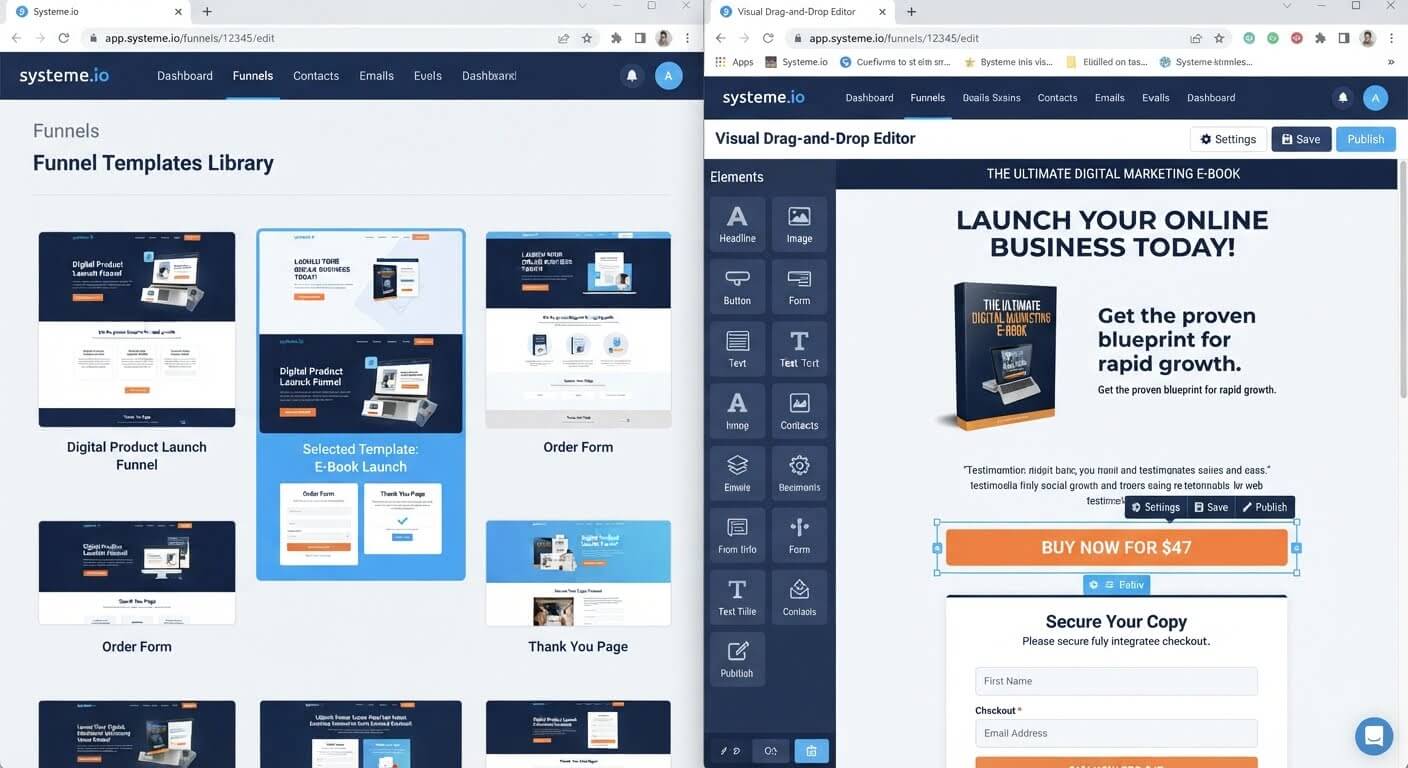
Here is the exact path to building it without design skills or a developer.
👉 Build your automated sales system without a designer for free here
Why This Cost Problem Happens
Most people assume a sales system requires custom design work because that's what agencies sell. A designer creates a branded page, a developer wires up the checkout, and an email specialist connects the automation. Each specialist charges separately.
The result is a $3,000–$10,000 project for what is essentially three connected pages and an email sequence.
The root issue is that modern funnel builders already include professional templates. You don't need a designer to create a page from scratch—you need to pick a template, swap the text, and connect your payment processor. The design work is done for you.
Step-by-Step Fix for Building the System Without a Designer
Step 1: Define What Your Sales System Actually Needs
Before touching any platform, list the minimum components. A simple automated sales system needs:
- A sales page that explains the offer
- A checkout page that accepts payment
- A delivery method (download, email, or course access)
- A follow-up email sequence for buyers and non-buyers
If your system includes more than these four pieces, you're overbuilding for a first launch.
Step 2: Choose a Platform with Pre-Built Funnel Templates
Systeme.io includes templates for every funnel type: audience-building opt-ins, product sales, webinars, and course launches. When you create a funnel, you pick a template rather than starting from a blank canvas.
The template already has the layout, sections, and element positions arranged. Your job is to swap the placeholder copy and images for your own.
Step 3: Customize with Drag-and-Drop (No Design Skills Required)
Open the page in the visual editor. Click on a headline to change the text. Click on an image to upload a new one. Drag a button or form into a column to add it.
You're not designing from scratch. You're rearranging pre-designed blocks that already look professional. The drag-and-drop editor handles alignment, spacing, and responsiveness automatically.
Step 4: Connect Checkout and Automatic Delivery
Connect Stripe or PayPal inside the funnel settings. Set your product price and description.
Then set up automatic delivery: when someone purchases, they receive an email with the download link or access instructions. Systeme.io triggers this email automatically after checkout—no manual delivery, no designer needed.
Step 5: Build the Email Follow-Up Sequence
Create a simple three-email sequence: purchase confirmation, a check-in two days later, and a related offer a week after. Use the automation builder to trigger the first email on purchase.
Systeme.io's automation builder uses a visual diagram. You add the trigger, add the email action, and save. No code, no webhook, no developer.
Step 6: Test the Entire System End-to-End
Run a test purchase with a real card. Confirm:
- The payment processes
- The delivery email arrives
- The buyer appears in your CRM
- The follow-up sequence is scheduled
Fix any broken links or missing emails before sending traffic.
👉 Set up your checkout and delivery without a designer here
The Easiest Way to Avoid This Issue Moving Forward
The simplest way to build an automated sales system without hiring anyone is to use a platform where templates, checkout, and email automation are already connected.
Systeme.io's free plan includes three funnels, 2,000 contacts, unlimited email sends, and checkout with 0% transaction fees. You can build a working sales system with a template, a connected payment processor, and one email sequence—no designer, no developer, no monthly software bill.
If you outgrow the free plan, the Startup plan is $17 per month for 5,000 contacts and five funnels. Compare that to a one-time designer fee of $2,000 or more.
Common Mistakes to Avoid
Trying to Design a Custom Page from Scratch
Templates exist to save time. Pick one that's close to your vision and customize it. Building from a blank canvas adds hours and rarely looks better.
Skipping the Test Purchase
A checkout that doesn't process payments is broken. Always run a live test transaction before sending traffic.
Building the System Before the Offer Is Ready
Don't spend days building pages for a product you haven't created. Finish the product first, then build the system to sell it.
Forgetting the Delivery Email
The most important automation is the one that delivers what the buyer paid for. Test it before launching.
Frequently Asked Questions
Do I need a web designer to build a sales system?
No. Platforms like Systeme.io include professional templates and a drag-and-drop editor. You can build a sales page, checkout, and email sequence without design skills.
How long does it take to build the system?
A simple sales page, checkout, delivery email, and follow-up sequence can be built in an afternoon if you have the product ready.
Can I use my own branding?
Yes. You can add your logo, adjust colors, and use your own images. The template provides the structure; you customize the visuals.
Do I need to know how to code?
No. The entire system—page, checkout, email automation—is built with drag-and-drop and point-and-click settings.
Conclusion
An automated sales system doesn't require a designer, a developer, or a $3,000 project. It requires a template, a payment processor, and one email sequence.
Systeme.io provides the templates and connects the pieces. You pick a layout, swap the text, connect Stripe or PayPal, and set up automatic delivery. The free plan covers everything a first launch needs.
Start with one product and one simple system. Add complexity only after the basics are working.
Your sales system doesn't need a designer. It needs you to start.
👉 Build your automated sales system for free today
Related Reading
Building a self-hosted marketing process lets you control your customer journey without extra payroll bills. To connect your frontend layout securely to your backend email sorting rules, check out my tutorial on how to connect a payment gateway to an email list automatically.