Someone downloads your free PDF, and then nothing happens. No follow-up, no welcome email, no relationship. You collected an email address, but you never actually used it.
The fix is a simple automation: capture the email, send the PDF instantly, and start a conversation automatically. Here's how to build that flow without coding or paying for extra tools.
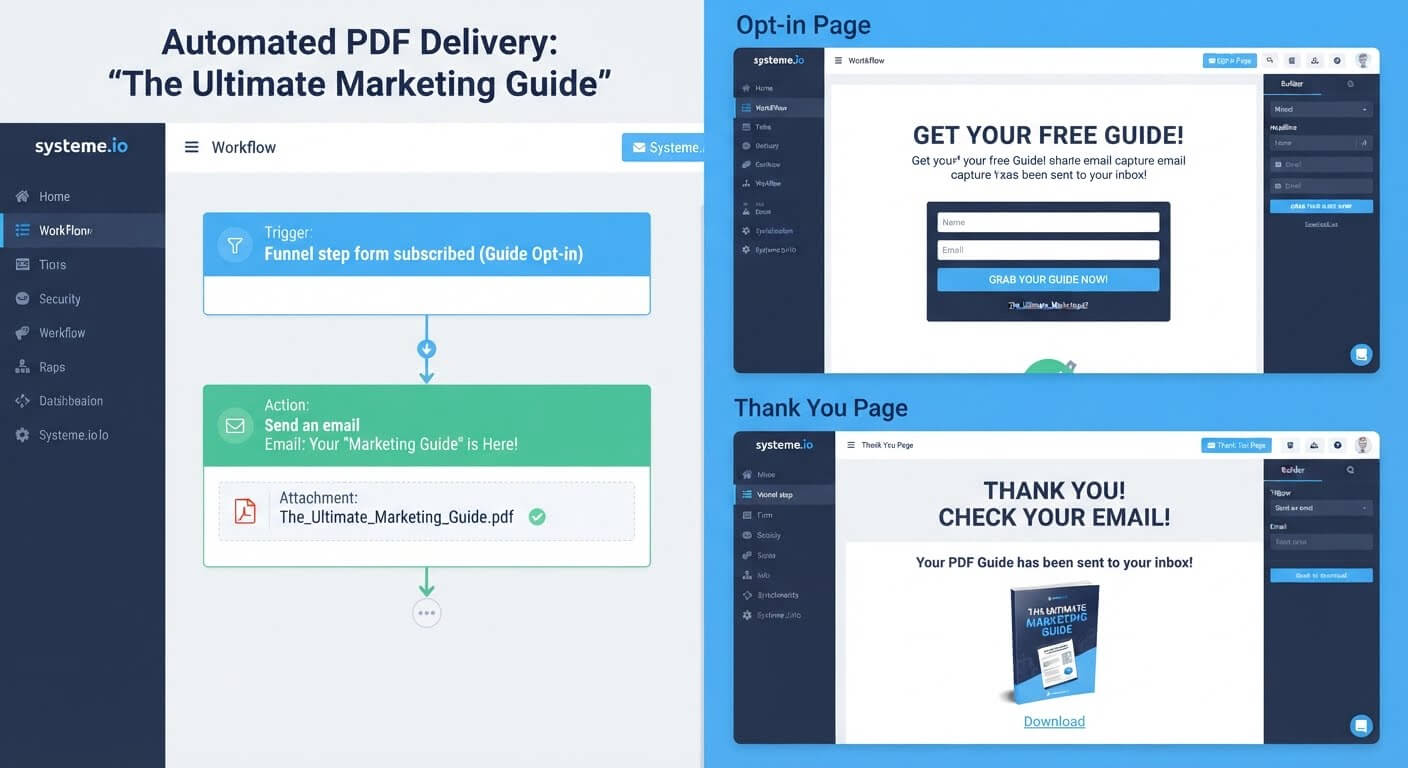
👉 Build your free PDF delivery automation here
Why This Delivery Gap Happens
Most people build the opt-in form first and think about delivery later. They add a form to a page, connect it to an email platform, and then realize they still need to send the PDF manually.
Others use a file-hosting link that requires a second email, a password, or a login. Every extra step loses subscribers.
The root issue is that email capture and file delivery are treated as separate tasks. When they live in the same platform, the form submission becomes the trigger, and the PDF delivery email sends automatically. No manual step, no delay.
Step-by-Step Fix for Email Capture and Automatic PDF Delivery
Step 1: Upload Your PDF to the Platform
Before you build anything, have the final PDF ready. Systeme.io's email attachments are limited to 5 MB, which covers most lead magnets.
If your PDF is larger—an illustrated guide, a workbook, a large report—upload it to cloud storage and include a download link in the delivery email instead of an attachment.
Step 2: Build the Opt-In Page
Create a funnel and add an opt-in page. Use a template to avoid starting from a blank canvas.
Add a headline that clearly states what the PDF is and who it's for. Add a short description of what it covers. Add a form with an email field.
Keep the form to one field. Every extra field reduces completions.
Step 3: Set the Form Button Action
Click the form's submit button and set the action to "Submit form."
This step is mandatory. Without it, the form won't save the email or trigger the automation. It's the most commonly missed step in the entire setup.
Step 4: Build the Thank-You Page
The thank-you page confirms the submission and tells the visitor where to find the PDF. It's also a natural place to introduce a next step, like a related resource or an offer.
Keep it short. The visitor's priority is getting the PDF, not reading a long welcome message.
Step 5: Write the Delivery Email
Create an email that:
- Confirms the subscription
- Attaches the PDF or includes a download link
- Sets expectations for future emails
- Asks for one small action, like replying to confirm they received it
Keep the delivery email short. The file is the point, not the message.
Step 6: Connect the Automation Rule
Go to Automations and create a rule. Set the trigger to "Funnel step form subscribed" and select the opt-in page you just built.
Add the action "Send email" and choose the delivery email you wrote. Save the email, then save the rule.
Now every new subscriber receives the PDF automatically, whether you're at your desk or asleep.
Step 7: Test the Entire Flow
Submit your own form using a real email address. Confirm:
- The PDF email arrives within seconds
- The attachment opens correctly or the link works
- The contact appears in your CRM
Fix any broken links or missing attachments before sending traffic.
👉 Set up your opt-in form and PDF delivery in one free account here
The Easiest Way to Avoid This Issue Moving Forward
The simplest way to avoid delivery gaps is to use a platform where the opt-in form and email automation share the same account.
Systeme.io includes the page builder, the form, and the email automation in one dashboard. A form submission triggers the delivery email directly—no manual step, no Zapier, no second tool.
The free plan includes 2,000 contacts, unlimited email sends, and three funnels. You can build the opt-in page, connect the delivery email, and start collecting subscribers without paying anything.
The one limit to know: email attachments are capped at 5 MB. For larger PDFs, use a download link in the email body. It works just as well and avoids failed deliveries.
Common Mistakes to Avoid
Forgetting to Set the Form Button to "Submit Form"
A form that looks fine on the page but doesn't trigger the automation is the most common failure. Always check the button action.
Attaching a PDF That's Too Large
Files over 5 MB may fail silently. Compress the PDF or use a download link instead.
Sending the PDF Manually
Manual delivery doesn't scale. Automate it from the first subscriber so nobody waits for you to check your inbox.
Asking for Too Much Information
Every extra form field reduces completion. Start with email only. You can collect more later as the relationship builds.
Not Testing the Attachment
A PDF that opens in your editor might not open on a subscriber's phone. Test the exact email a subscriber receives before launching.
Frequently Asked Questions
Can I attach a PDF to an automated email?
Yes. Systeme.io allows attachments up to 5 MB. For larger files, upload to cloud storage and include a download link in the email.
Do I need a separate file-hosting tool?
No, if your PDF fits within the 5 MB limit. For larger files, any free cloud storage service works as a host for the download link.
How do I make sure the PDF sends automatically?
Set the form's button action to "Submit form," then create an automation rule with the trigger "Funnel step form subscribed" and the action "Send email." The email must be saved and the rule must be active.
Can I collect emails and deliver a PDF on the free plan?
Yes. Systeme.io's free plan includes forms, email automation, 2,000 contacts, and unlimited email sends—all without a credit card.
Conclusion
Collecting emails and delivering a PDF automatically comes down to one rule: when the form is submitted, send the email.
The setup takes under an hour once your PDF is ready. Build the opt-in page, set the button action, write the delivery email, and connect the automation rule.
Systeme.io's free plan covers the entire flow—from the form to the delivery email to the contact record—without requiring a second tool or a monthly subscription.
Your subscribers asked for the PDF. Deliver it automatically, and the relationship starts on the right foot.
👉 Start collecting emails and delivering your PDF for free today
Related Reading
Automating your initial lead magnet delivery is the perfect way to build your early list. When you are ready to expand your catalog to paid offers, check out my analysis on the Best Simple Software for Delivering Digital Products After Purchase to fulfill orders smoothly.