A customer buys your ebook and then waits hours for a manual email with the download link. That delay is where refund requests and distrust begin.
The fix is choosing a platform that delivers the product automatically the moment payment clears. Here's what to look for and the simplest option available.
👉 Deliver your digital products automatically for free here
Why This Delivery Problem Happens
Most digital product sellers start with a payment link and a manual process. The buyer pays through Stripe or PayPal, and then the seller has to notice the sale, find the file, and email it manually.
That works for the first few sales. It breaks completely once you're asleep, on vacation, or simply busy with something else.
The root issue is that payment processing and product delivery are treated as separate steps. Unless your checkout system is connected to a delivery mechanism, every sale requires human intervention. A platform where checkout and delivery live together removes that gap entirely.
Step-by-Step Fix for Setting Up Automatic Delivery
Step 1: Choose a Platform Where Checkout and Delivery Are Connected
Your checkout system and your delivery method need to share the same database. If they don't, you're back to manual work or paying for a connector like Zapier.
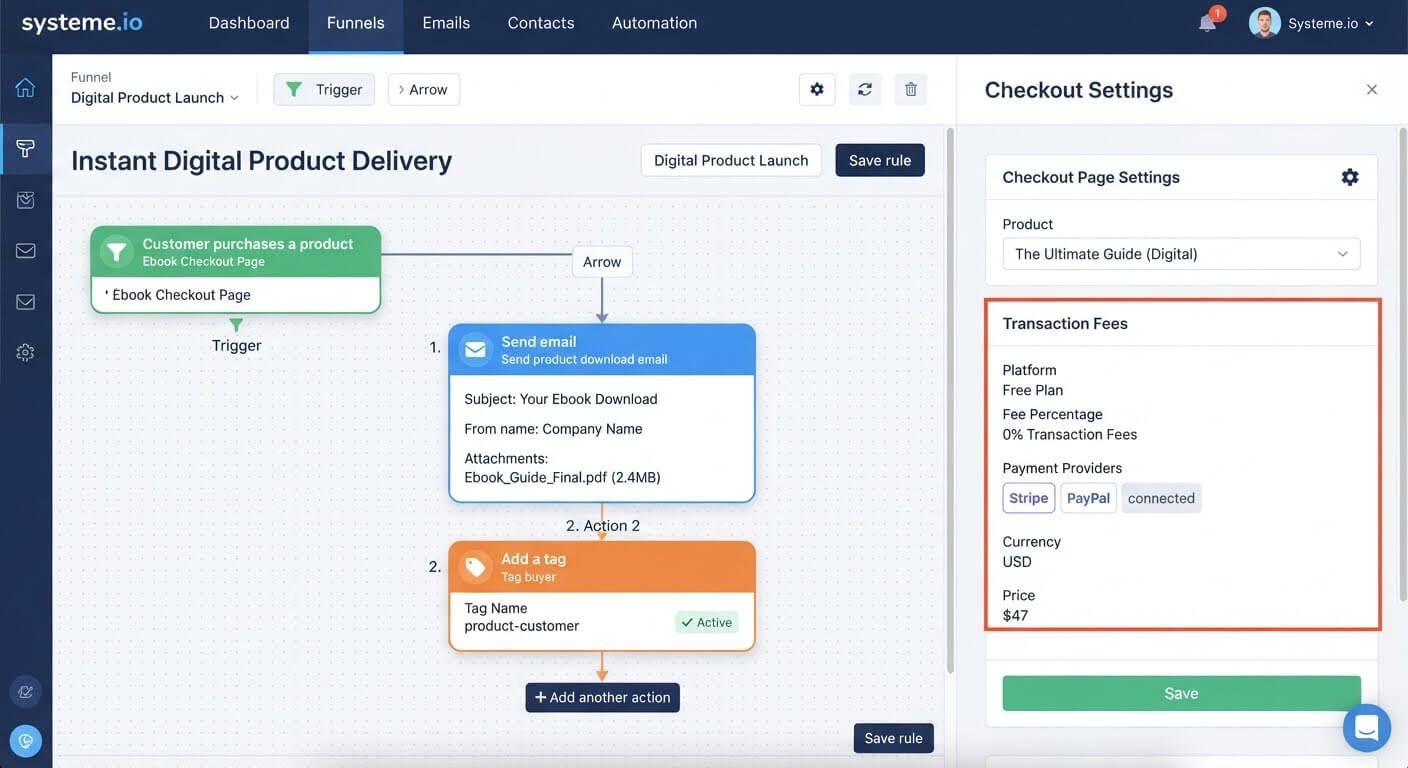
Systeme.io includes both checkout and automatic delivery** in one account. When someone pays, the delivery email triggers without any extra configuration.
Step 2: Upload Your Digital Product
Inside the platform, upload the file you're selling. Systeme.io supports attachments up to 5 MB** per email.
For larger files—video courses, large PDFs, software bundles—upload to cloud storage and include a download link in the delivery email instead of an attachment.
Step 3: Set the Delivery Email Content
Write a clear delivery email that includes:
- A thank-you message confirming the purchase
- The download link or attached file
- Next steps if applicable (booking a call, joining a group, accessing a course)
- A support contact in case the download fails
Keep it short. The buyer's priority is getting the file, not reading a long welcome message.
Step 4: Connect the Delivery Email to the Purchase Trigger
In the automation builder, create a rule with the trigger set to "Customer purchases a product" or the equivalent purchase event. Then add the action "Send email" and select the delivery email you wrote.
Save the rule. From that moment on, every purchase triggers the email automatically.
Step 5: Tag Buyers for Future Segmentation
Add a tag action to the same rule. Apply a tag like "product-buyer" or the specific product name.
This lets you send targeted follow-up emails to buyers later, separate from what non-buyers receive.
Step 6: Test the Entire Flow End-to-End
Make a real test purchase with your own card. Confirm:
- The payment processes correctly
- The delivery email arrives within seconds
- The download link or attachment works
- The buyer appears in your CRM with the correct tag
Fix any broken links or missing files before sending traffic.
👉 Set up automatic product delivery in one free account here
The Easiest Way to Avoid This Issue Moving Forward
The simplest way to avoid delivery delays is to use a platform where checkout and delivery are already connected.
Systeme.io's free plan includes checkout with 0% transaction fees, 2,000 contacts, unlimited email sends, and automatic delivery triggered by purchase. There's no Zapier, no manual email, and no separate file-hosting service.
The 5 MB attachment limit is worth knowing upfront. For anything larger, cloud storage plus a download link solves it cleanly. And the free plan's 2,000-contact cap is generous for a first launch—you'll only upgrade when your buyer list actually outgrows it.
Common Mistakes to Avoid
Sending Delivery Emails Manually
Manual delivery doesn't scale. It also creates delays that hurt the buyer experience. Automate it from the first sale.
Attaching Files That Are Too Large
Most platforms cap email attachments at 5 MB. If your file exceeds that, the email may fail silently. Use a download link instead.
Forgetting to Test the Download Link
A broken link after payment is worse than a slow delivery. Test the exact email a buyer receives before launching.
Skipping the Buyer Tag
If buyers look identical to non-buyers in your CRM, you can't send them targeted follow-ups. Tag at purchase so you can segment later.
Relying on a Separate File-Hosting Tool
Services like Google Drive or Dropbox work for sharing files, but they weren't designed for post-purchase delivery. A built-in delivery system keeps the flow in one place.
Frequently Asked Questions
What's the simplest software for delivering digital products automatically?
Systeme.io includes checkout and automatic delivery in one account. When a purchase happens, the delivery email triggers immediately—no connector or manual step required.
Can I attach large files to the delivery email?
Attachments are typically limited to 5 MB. For larger files, upload to cloud storage and include a download link in the delivery email.
Do I need Zapier to connect payment to delivery?
No, if your checkout and delivery live in the same platform. Zapier is only needed when payment and email tools are separate products.
Can I send different delivery emails for different products?
Yes. Create a separate automation rule for each product, or use product-specific tags to trigger different delivery emails.
Conclusion
Delivering digital products after purchase should be automatic, instant, and invisible to you. Any manual step is a delay waiting to happen.
The setup is straightforward: choose a platform where checkout and delivery share the same account, upload your product, write the delivery email, connect it to the purchase trigger, and test the flow.
Systeme.io covers all of this on its free plan with 0% transaction fees. Buyers get their file within seconds of paying, and you don't have to be anywhere near your inbox.
Your customers paid for a fast, smooth experience. Automatic delivery is the simplest way to give it to them.
👉 Start delivering your digital products automatically for free today
Related Reading
Securing a reliable fulfillment tool keeps your customer experience seamless. If you want to use this same systematic logic to distribute free resources and grow your subscriber base first, look at my tutorial on How to Collect Emails and Send a Free PDF Automatically.