You've recorded a webinar that converts, but running it live every week is exhausting and doesn't scale. An automated webinar funnel solves that—but most tutorials make it sound like you need a developer to set it up.
The honest truth is that the technical part is just picking a template, uploading a video, and setting a registration date. The hard part is deciding whether your content is actually ready to be automated.
👉 Build your automated webinar funnel without the tech headache here
Why This Error Happens
Most guides for automated webinars assume you already understand funnel mechanics. They jump straight into "add a webinar date element" or "configure the popup settings" without explaining what those things actually do.
The other problem is that automated webinar features are often locked behind premium plans. ClickFunnels requires a paid subscription. Kajabi's webinar setup uses Zoom, which costs extra for the Webinar feature . Systeme.io's automated webinar funnel is only available on its Webinar or Unlimited plans, not the free tier .
The root issue is that automated webinars sit at the intersection of video hosting, email automation, and funnel building. When those live in different tools, the setup becomes a technical puzzle. When they live in one platform, it's a checklist.
Step-by-Step Fix for Building the Funnel Without the Tech Overwhelm
Step 1: Confirm Your Recording Is Ready for Automation
Before touching any software, watch your recorded webinar with a critical eye. Look for anything that will feel wrong when someone watches it six months from now.
References to "today," "this week," or a specific date need to be cut. Prices, software menus, and product limits need to match what viewers will actually see when they watch .
If the content is evergreen—a repeatable lesson that doesn't depend on a live moment—you're ready. If it relies on real-time Q&A or interaction, an automated format will feel like a bait-and-switch .
Step 2: Choose the Automated Webinar Funnel Type
In Systeme.io, go to Sites, then Sales Funnels, and click Create. Name your funnel and select Run an evergreen webinar as the goal .
This creates a funnel with three pages by default: a registration page, a thank-you page, and the webinar broadcast room. You don't need to build these from scratch.
Step 3: Pick a Template for the Registration Page
Systeme.io shows a library of templates. Browse until you find one that roughly matches your brand or offer, then select it .
Don't spend hours designing. The template already has the structure. Your job is to swap the placeholder text for your own headline, description, and registration form.
Step 4: Configure the Registration Date (The One Mandatory Step)
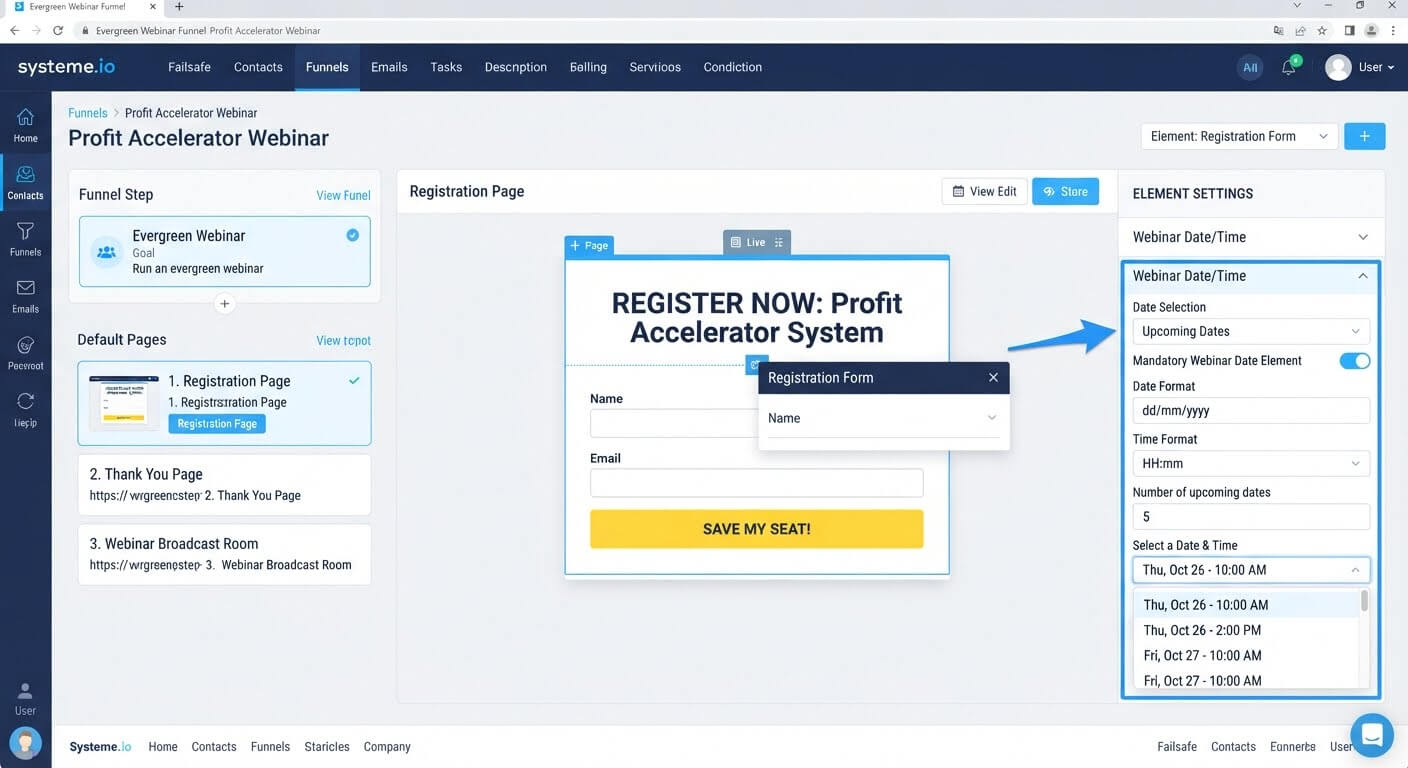
This is where most beginners get stuck. Systeme.io requires you to configure the webinar date element inside the registration form .
Click the date element in your form and set the options. Because the webinar is evergreen, you can't set a fixed calendar date like "October 5th." Instead, the system shows each visitor a session time based on when they arrive—for example, "Today at 2:00 PM" .
This is the core mechanic of an automated webinar. Every registrant sees a session that feels current to them.
Step 5: Upload Your Video to the Broadcast Room
Go to the webinar broadcast room page in your funnel and click Edit page. Find the video element and paste the URL of your hosted recording .
Your video needs to be hosted somewhere first—YouTube (unlisted), Vimeo, or a similar service. Systeme.io doesn't host the webinar video itself; it embeds it.
Step 6: Test the Registration Flow
Open your registration page in a private browsing window and sign up with a real email address. Confirm that:
- The confirmation email arrives
- The thank-you page loads
- The webinar room becomes accessible after registration
Systeme.io's thank-you and conference pages can't be accessed directly by URL—they only appear after a lead registers . This is by design, not a bug.
👉 Set up your automated webinar funnel without touching code here
The Easiest Way to Avoid This Issue Moving Forward
The simplest way to build an automated webinar funnel without technical friction is to choose a platform where the webinar funnel, email automation, and registration are already connected.
Systeme.io's evergreen webinar funnel handles registration, date configuration, and access control in one flow. You pick a template, set the date element, upload your video, and test. There's no Zapier connection, no separate email tool, and no custom code.
The catch is that the automated webinar feature requires the Webinar or Unlimited plan . If you're not ready to upgrade, you can still build a standard funnel (registration page plus thank-you page plus email delivery) on the free plan, then add the webinar room later.
For creators whose webinar is proven and repeatable, the upgrade pays for itself by letting the same presentation generate leads around the clock.
Common Mistakes to Avoid
Automating a Webinar That Never Converted Live
Recording a webinar that didn't work and scaling it just means more people see a presentation that doesn't sell. Prove it live first, then automate the winner .
Faking Live Energy
Don't script fake chat messages, fake attendee counts, or fake "I see everyone joining" lines. Viewers notice, and the trust damage outweighs any short-term conversion gain .
Forgetting to Edit Out Dated References
A recording that says "as you can see on the screen right now" or references a specific month will feel broken to someone watching six months later. Audit the recording before uploading .
Skipping the Test Registration
The thank-you and broadcast pages can't be opened directly by URL. If you don't test the actual registration flow, you won't know whether the access path works .
Frequently Asked Questions
Do I need a paid plan to build an automated webinar in Systeme.io?
Yes. The evergreen webinar funnel is available on the Webinar plan or the Unlimited plan, not the free tier .
Can I run a live webinar in Systeme.io?
No. Systeme.io currently supports only automated (evergreen) webinars. For live events, you'd need a different tool .
Can I set a specific date for my automated webinar, like October 5th?
No. Evergreen webinars show each visitor a session time based on when they arrive. You can't fix a calendar date because the format is designed to run continuously .
How long should the recording be?
Long enough to teach something useful and make an offer, short enough that viewers don't drop off. Most automated webinars run 30 to 60 minutes. Test with your audience and check watch-time analytics to see where people leave.
Conclusion
Building an automated webinar funnel doesn't require heavy tech skills. It requires a recording that's genuinely evergreen, a template, and one mandatory date configuration step.
The technical part is smaller than most guides make it seem. Pick the evergreen webinar funnel type, choose a template, set the date element inside the registration form, upload your video, and test the flow.
Systeme.io bundles the registration, email confirmation, and access control into one funnel. You don't need to connect Zapier or configure webhooks.
The bigger decision is whether your webinar is ready to be automated. If it converted live and the content won't age, an automated funnel lets that presentation keep working without you in the room.
👉 Start building your automated webinar funnel today
Related Reading
Running automated video funnels allows you to pitch your offers around the clock with zero tech stress. To nurture the new leads coming into your ecosystem before and after your presentation, follow my guide on how to set up an email autoresponder without coding knowledge.