Sending the same email to everyone on your list is why your open rates keep dropping. A quiz solves this by asking two or three questions, then automatically tagging each subscriber based on their answers.
The setup is simpler than it sounds, and you don't need a separate quiz tool to do it.
👉 Build your first segmenting quiz for free here
Why This Segmentation Problem Happens
Most email lists start as a single bucket. Everyone who opts in gets the same welcome email and the same offers, regardless of why they signed up.
The result is predictable. Subscribers who wanted one thing get emails about something else, lose interest, and stop opening.
The root issue is that a form only captures an email address, not context. You know someone subscribed, but not what they're struggling with or what they're looking for. A quiz adds that missing context by asking questions before you send anything.
Step-by-Step Fix for Building a Quiz That Segments Your List
Step 1: Decide What You Want to Learn About Your Subscribers
A quiz should collect information you'll actually use. Pick one dimension to segment on:
- Experience level (beginner, intermediate, advanced)
- Main goal (save time, make money, learn a skill)
- Biggest obstacle (no time, no budget, no clarity)
Two or three questions are enough. More than five and completion rates drop.
Step 2: Build the Quiz Page
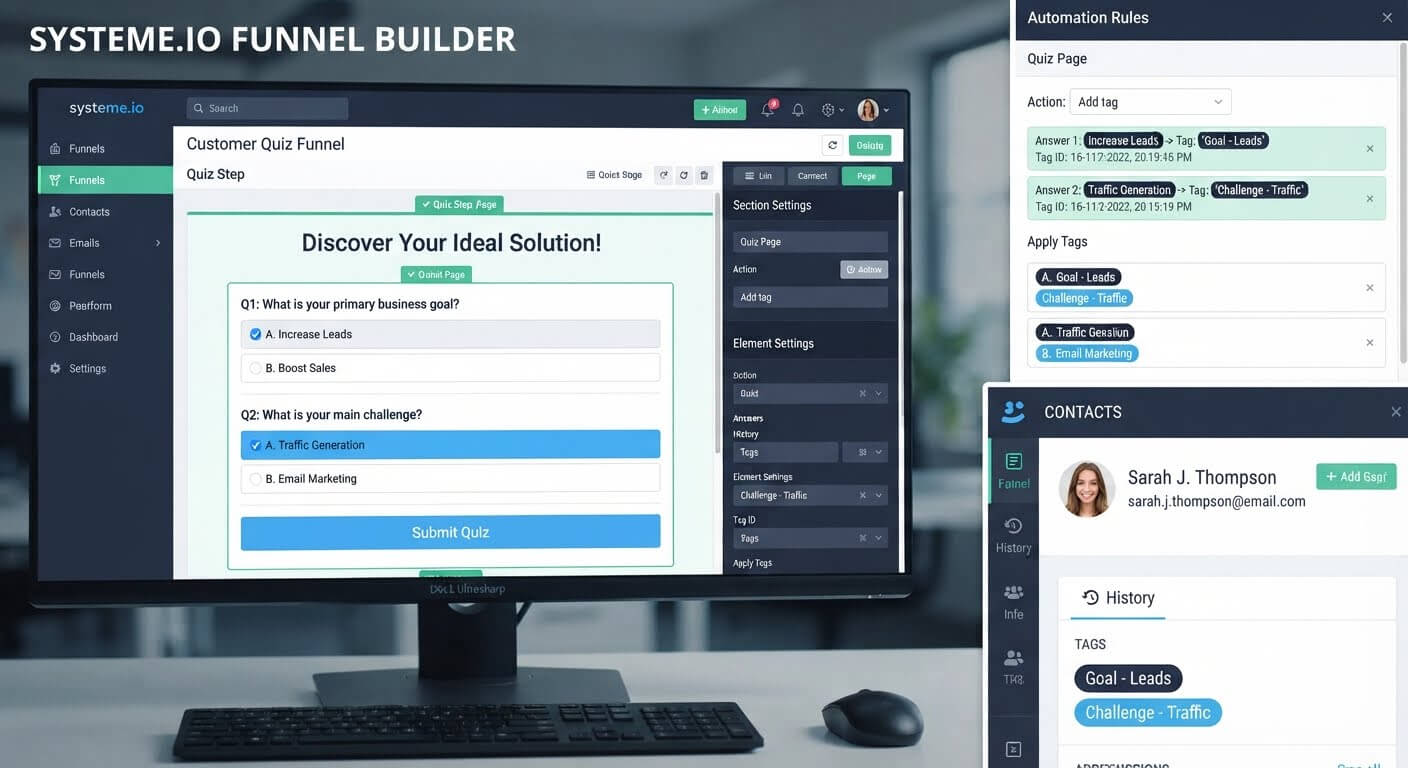
In Systeme.io, create a new page inside your funnel and use a form element to build your quiz.
For each question, add multiple-choice options. Each option will eventually be tied to a specific tag, so name them clearly—"beginner," "advanced," "needs-budget-help."
You can keep the quiz as simple as a single page with all questions visible, or split it across multiple steps if you want a more guided experience.
Step 3: Create the Tags First
Before you connect anything, create the tags you'll use to segment subscribers. A clean naming convention helps: "quiz-beginner," "quiz-advanced," "goal-make-money."
Each answer option maps to one tag. That tag is how the system will know what kind of subscriber you have after they finish.
Step 4: Set Up Conditional Logic (If Your Platform Supports It)
If your quiz branches—meaning the next question depends on the previous answer—use conditional logic to show only relevant follow-ups.
For a simple quiz, you can skip branching and show the same questions to everyone. The segmentation still works because tags are applied based on the answers, not the quiz path.
Step 5: Connect Each Answer to a Tag
This is the step most people miss. The quiz only segments your list if each answer applies a tag.
In Systeme.io, you can attach tags to form responses or use an automation rule triggered by the quiz submission. Each answer option gets its own tag, so a subscriber who selects "advanced" and "make money" ends up with both tags.
Step 6: Send a Result Email With a Follow-Up
After the quiz is submitted, send an email that acknowledges their answers and delivers something useful—a resource, a recommendation, or a next step.
Because their tags are already applied, you can send different result emails to different answer combinations.
Step 7: Use the Tags in Future Campaigns
Now the real work begins. When you send a campaign, you can filter by tag so only the relevant group receives it.
Beginners get beginner-focused content. Advanced subscribers skip the basics and get the next step. The quiz does the sorting for you.
👉 Set up your quiz and tags in one free account here
The Easiest Way to Avoid This Issue Moving Forward
The simplest way to segment your list is to build the quiz inside the same platform that stores your contacts and sends your emails.
Systeme.io includes page building, form submissions, tagging, and email automation in one account. A quiz submission triggers a tag, and that tag powers every future campaign—no Zapier, no export/import, no manual sorting.
The free plan includes 2,000 contacts, unlimited email sends, and three funnels, which is enough to build a working quiz and start segmenting from day one. If you outgrow those limits, the Startup plan is $17 per month for 5,000 contacts.
Common Mistakes to Avoid
Asking Too Many Questions
Every extra question reduces completion rates. Two or three is the sweet spot. You can always ask more later.
Forgetting to Connect Answers to Tags
A quiz without tags is just a survey. The segmentation only happens when each answer applies a tag to the contact.
Not Sending a Result Email
The quiz asks for their time. Acknowledge it with a result email that delivers something useful—otherwise the quiz feels like a dead end.
Using Vague Tag Names
Tags like "type-A" or "segment-1" become unusable six months later. Name tags by what they mean so future-you knows what to do with them.
Creating Tags After the Quiz Is Live
If subscribers finish the quiz before the tags exist, they get no tags. Create the tags first, then build the quiz.
Frequently Asked Questions
Can I build a quiz in Systeme.io?
Yes. Systeme.io's form builder supports multiple-choice questions, and tags can be applied based on each answer. The whole quiz plus segmentation can run inside one funnel.
Do I need a separate quiz tool?
No, if your platform supports forms and tagging. A separate quiz tool adds cost and requires an integration to push tags into your email platform.
How many questions should a segmenting quiz have?
Two to three questions are enough to segment meaningfully without losing completions. Five is the practical upper limit.
Can different subscribers get different result emails?
Yes. Because each answer applies a tag, you can build separate automation rules that send different result emails to different tag combinations.
Conclusion
A quiz turns a flat email list into segments you can actually send relevant emails to. The setup is smaller than most guides suggest: two questions, a tag per answer, and one automation rule.
Systeme.io covers the whole flow—page, form, tags, and email—on its free plan. You can build and test a working quiz without paying anything or connecting a second tool.
Start with one question. Add the tag. Send a result email. Then add the next question.
Your subscribers will tell you who they are—if you ask.
👉 Build your segmenting quiz for free today
Related Reading
Using interactive quizzes is an incredible way to personalize your audience data. To manage your lists, funnels, and tracking dashboards under one centralized roof without multiple subscriptions, read my roadmap on How to Replace and Combine Your Business Software Tools in One Place.