Switching platforms feels risky because your members are the business. If they lose access to courses they paid for, or get double-charged during the transition, you'll spend weeks putting out fires instead of enjoying the lower bill.
The good news is that a proper migration can keep every member enrolled and every course accessible. The bad news is that recurring billing cannot transfer automatically—and that's the part most guides gloss over.
👉 Migrate your members and courses safely with a free account here
Why This Member Problem Happens
Kajabi stores three things that matter for your members: their login credentials, their course access entitlements, and their payment details.
The first two can be exported and recreated. Kajabi lets you download your contact list as a CSV with names, emails, and tags . Those tags are how the new platform knows who should be enrolled in which course.
The third one—payment details—cannot be moved between platforms. Card information is held by the payment processor (usually Stripe), not by Kajabi itself. When you switch, active subscribers must re-enter their payment details on the new platform, or their subscription will lapse .
The root issue is that a migration is not just a data transfer. It's a billing handoff. If you don't plan the handoff, paying members either lose access or get charged twice.
Step-by-Step Fix for Moving Your Members Safely
Step 1: Export Your Member List While Kajabi Is Still Active
Log into Kajabi and go to People > Export. Download the CSV containing every member's email, name, and tags .
Do this before you cancel anything. Once your Kajabi subscription lapses, you may lose access to the export tools and your video files .
Step 2: Build the New Course Structure First
Before you touch the member list, rebuild your courses on the new platform. Upload the videos, recreate the modules and lessons, and set up the course access rules.
If you're using Systeme.io's migration service, their team handles this step for you when you're on an Unlimited or annual plan . They import courses individually, including modules, lectures, and quizzes.
Step 3: Import Members and Apply Their Tags
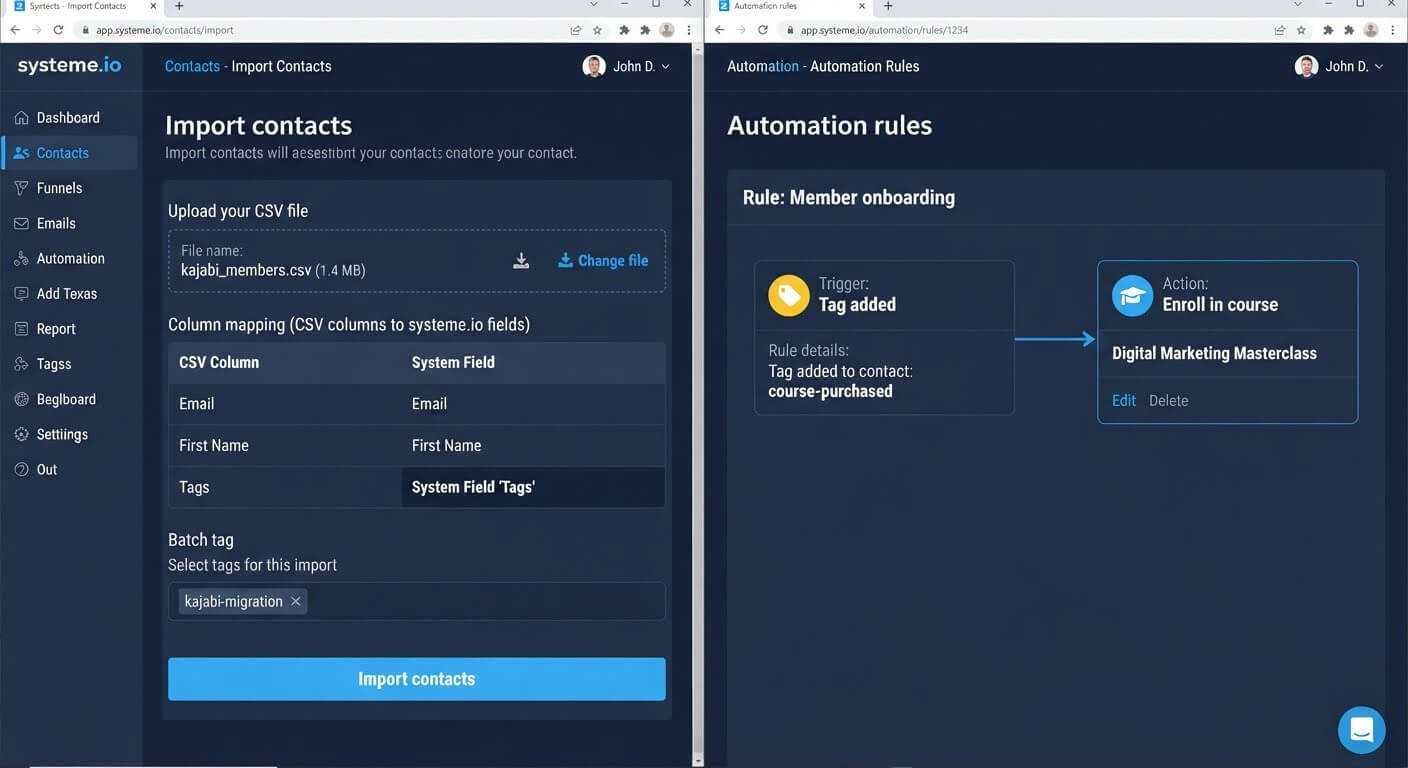
Upload your CSV into the new platform's CRM. During the import, map the tags column correctly so each member keeps their original labels .
Those tags are critical. The migration service uses them to automatically enroll students in the correct courses after the import is complete .
Step 4: Recreate Access for Existing Buyers
Every member who paid for a course must retain access—without paying again.
Create an automation rule: when a contact has the "course-purchased" tag, enroll them in the corresponding course. This replaces the manual enrollment they had on Kajabi.
Test this with one contact before applying it to the full list.
Step 5: Handle Recurring Billing Separately
This is the step that requires direct communication with your members.
Kajabi's subscriptions run through its checkout system. On the new platform, you need to reconnect your Stripe account and ask each active subscriber to re-enter their payment details .
The cleanest approach: keep Kajabi active until the member's next billing date passes, so nobody pays twice. Send a clear email explaining that their access continues, but they need to update their payment method on the new platform before the next renewal.
Step 6: Notify Members Before the Switch Goes Live
Send a short, calm email explaining what's changing. Tell them:
- Their course access is continuing
- Whether they need to do anything (like re-enter payment info)
- Where to log in on the new platform
If members are surprised by a login change or a payment request, they'll open support tickets. If they're warned in advance, it's a non-issue .
Step 7: Keep Both Platforms Active During the Overlap
Do not cancel Kajabi on the day the new platform goes live. Run both in parallel for at least two weeks after the migration.
This gives you a fallback if something breaks, and it ensures no member falls through the gap between the old billing cycle and the new one .
👉 Import your members and rebuild their access for free here
The Easiest Way to Avoid This Issue Moving Forward
The simplest way to move members without losing them is to use a platform that offers a done-for-you migration service.
Systeme.io provides free business migration when you subscribe to the Unlimited monthly plan or any annual plan. Their team manually recreates your funnels, courses, emails, and automations—and imports your contacts with their tags intact .
The service also handles enrolling students in their courses using the tags from your Kajabi export, so you don't have to rebuild access manually .
The honest limit: the migration service copies content, but it does not transfer payment details. You still need to communicate with active subscribers about re-entering their billing information. No platform can move card details between systems—that's a security restriction, not a platform limitation .
If you're on the free plan, you can still import contacts and rebuild courses manually. The trade-off is time: a mid-sized course takes a day to rebuild, and the member re-enrollment automation takes another hour to configure and test.
Common Mistakes to Avoid
Cancelling Kajabi Before Exporting Members
Once your Kajabi account closes, your member CSV and video files may become inaccessible. Export everything first, then cancel .
Expecting Subscriptions to Transfer Automatically
Card details live with the payment processor, not the platform. Plan a re-subscribe campaign for active members before their next billing date.
Forgetting to Apply Tags During Import
Without tags, the automation can't identify which member should be enrolled in which course. Map the tags column correctly during import .
Making Members Pay Again for Access They Already Bought
Existing buyers should keep their access without a new purchase. Use a tag-triggered automation to enroll them, not a new checkout.
Switching Without a Warning Email
A surprise login change or payment request generates support tickets. Send a clear heads-up before the switch goes live .
Frequently Asked Questions
Will my members lose access to courses they already paid for?
Not if you migrate correctly. Export your member list, import it with tags, and set up an automation that enrolls tagged members in the new course. Their access continues on the new platform.
Do active subscriptions transfer automatically?
No. Payment details cannot move between platforms. Active subscribers need to re-enter their payment information on the new platform before their next billing date .
Does Systeme.io migrate my members for me?
Yes, if you're on the Unlimited monthly plan or an annual plan. The migration service imports contacts and their tags, then enrolls students in courses using automation . On the free plan, you import and configure this yourself.
How long should I keep Kajabi active after the switch?
At least two weeks after the new platform is live. This overlap ensures no member falls through the gap between billing cycles .
Conclusion
Moving from Kajabi to a cheaper platform doesn't have to mean losing members. It means moving them carefully.
Export the list while Kajabi is active. Rebuild the courses. Import members with their tags. Use automation to restore access. Communicate the billing change before it happens. Keep both platforms running during the overlap.
Systeme.io's migration service handles the content and contact import when you're on an eligible plan. The billing handoff is the one piece you must manage yourself—and it's the piece that determines whether your members stay happy or start looking for refunds.
Your members paid for access. Make sure they keep it.
👉 Start your member migration for free today
Related Reading
Protecting your active membership database removes massive friction from your platform migration. To replicate your front-end marketing pages and sales funnels inside your new dashboard as well, follow my tutorial on How to Recreate a ClickFunnels Landing Page Inside Systeme.io.