You started using Mailchimp when your email list was tiny. It was free, easy to set up, and had everything a beginner needed.
Then your list grew. Slowly at first, then faster. And with each new subscriber, Mailchimp's pricing crept higher.
Now you're paying $50 or more per month for a list that isn't even that big. And you're wondering if there's a better way.
👉 Switch to a free email platform that scales with you here
The Headache: Why Mailchimp's Pricing Catches Up Fast
Mailchimp used to be the go-to free email platform for beginners. The free plan was generous, and the paid tiers were affordable.
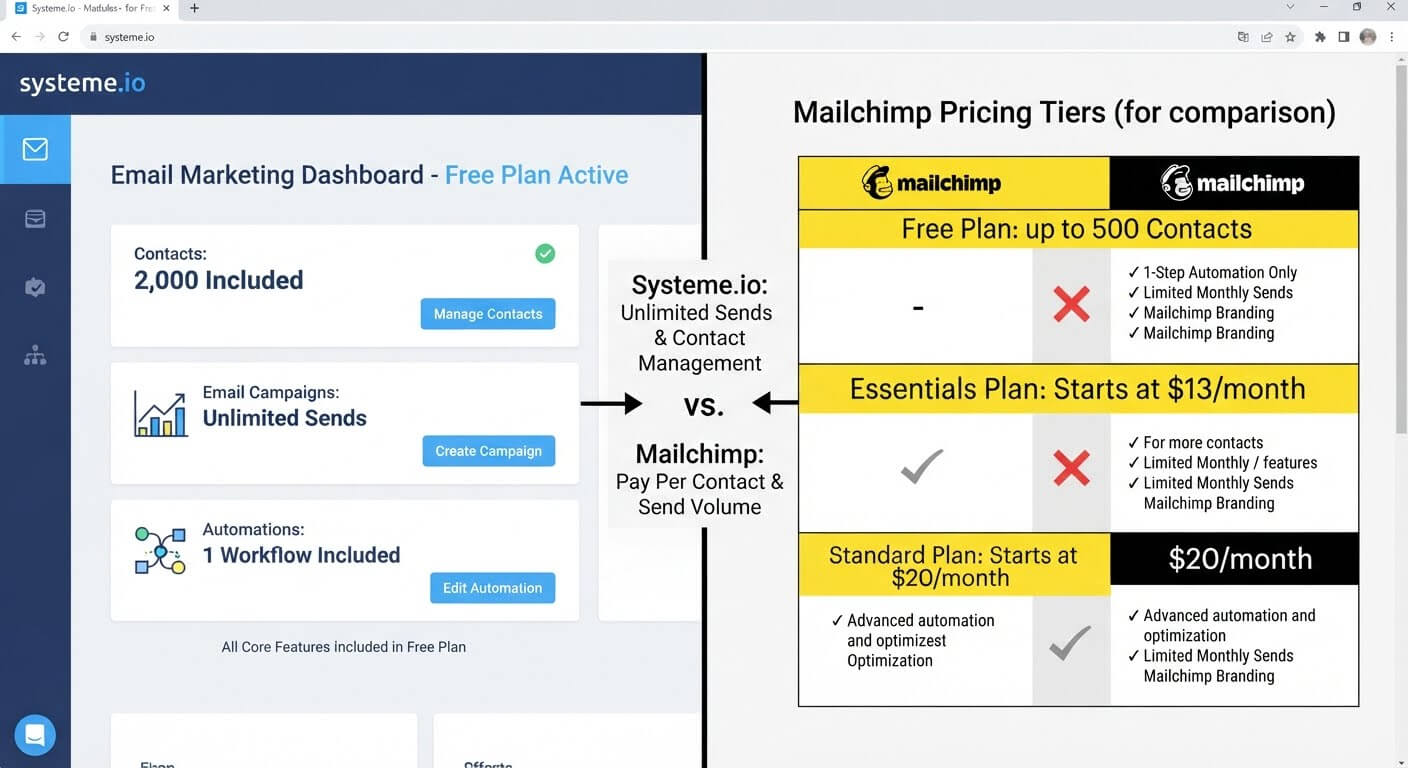
That's changed. Mailchimp's free plan now limits you to 500 contacts and 1,000 sends per month. Once you cross those thresholds, you're pushed into a paid plan starting around $13 per month—and it climbs from there.
By the time you have 2,500 subscribers, you're paying $50 or more per month. At 10,000 subscribers, it's closer to $100.
For a small creator or solo business, those numbers hurt. You're paying enterprise-level prices for a list that's still growing.
The Step-by-Step Fix: Finding a Cheaper Email Platform
Step 1: Calculate What You're Actually Paying
Before switching, get clear on your real cost. Log into Mailchimp and check your current plan and billing.
Note the monthly charge, the subscriber limit, and the send limit. Then multiply the monthly charge by 12 to see your annual cost.
That number is your baseline. Any alternative should beat it significantly.
Step 2: Identify What You Actually Use
Most email users don't need every feature Mailchimp offers. Be honest about what you use:
- Sending broadcasts
- Building automations
- Tagging and segmenting contacts
- Tracking opens and clicks
- Creating landing pages or signup forms
If you're paying for advanced features you never touch, you're overpaying.
Step 3: Look for Platforms with Generous Free Plans
The best alternative is a platform where the free plan covers your needs without subscriber caps that force an upgrade too soon.
Look for these features on free plans:
- Unlimited emails to your list
- Automation included
- Tagging and segmentation
- Landing pages and forms
Not every platform offers all of these for free. But some do.
Step 4: Export Your Mailchimp Data
Before you switch, export your subscriber list, tags, and any automations you've built. You'll need this data to migrate.
Mailchimp lets you export contacts as a CSV file. Save it somewhere safe.
Step 5: Choose Your New Platform
Look for a platform that includes email marketing plus the other tools you're paying for separately—like landing pages, automation, and CRM.
Consolidating tools means one subscription instead of three. That's where the real savings come from.
Step 6: Import and Rebuild
Import your contact list into the new platform. Recreate your tags, segments, and automations.
Test everything with a small segment before sending to your full list.
Step 7: Cancel Mailchimp Once You're Confident
Don't cancel immediately. Keep your Mailchimp account active for 30 days while you confirm the new platform works.
Once you're confident, cancel and enjoy the savings.
👉 Replace Mailchimp with a free email platform that scales with you
The Solution: Systeme.io Offers Email Marketing Without the Price Creep
Systeme.io is an all-in-one platform that includes email marketing, automation, landing pages, and CRM. The free plan covers the core features most creators need.
Unlimited Emails on the Free Plan
Unlike Mailchimp, Systeme.io doesn't cap your sends on the free plan. You can email your entire list as often as you want.
This matters because email frequency is part of a healthy strategy. Send limits force you to choose between reaching your audience and staying within the plan.
Automation Included
Automation is a premium feature on many platforms, including Mailchimp. On Systeme.io, it's included on the free plan.
You can build welcome sequences, tag-triggered emails, and behavioral automations without paying extra.
Landing Pages and Forms
Building an opt-in form or landing page usually requires a separate tool. Systeme.io includes both.
Create a signup page, connect it to your email list, and start collecting subscribers without paying for a page builder.
Tagging and Segmentation
Organize your list with tags. Segment by interest, behavior, or source.
Send targeted emails to specific groups without maintaining multiple lists.
CRM and Contact Management
Every subscriber is stored in the Systeme.io CRM. You can see their email history, tags, and engagement data in one place.
Transparent Pricing
Systeme.io's free plan has clear limits—2,000 contacts and 5,000 emails per month. Once you outgrow that, the paid plans start at $27 per month, which is lower than Mailchimp's comparable tier.
Best Practices When Switching from Mailchimp
Export Everything Before You Cancel
Once you cancel Mailchimp, your data may become inaccessible. Export contacts, tags, and any important reports first.
Notify Your Subscribers
Send a short email letting subscribers know you're switching platforms. Mention that they don't need to do anything and that future emails will come from your new address.
Rebuild Your Most Important Automations First
Start with your welcome sequence. Then move to tag-triggered emails. Rebuild in order of importance.
Test Deliverability
Send test emails to multiple addresses before sending to your full list. Confirm that your emails land in inboxes, not spam folders.
Common Mistakes to Avoid
Canceling Mailchimp Too Soon
Keep your old account active during the transition. If something breaks, you have a fallback.
Forgetting to Export Tags
Tags are essential for segmentation. If you don't export them, you lose the ability to send targeted campaigns.
Not Testing the Import
After importing your list, check that all contacts transferred correctly. Verify that tags and custom fields came through.
Ignoring Deliverability After Switching
A new sending domain takes time to warm up. Send to smaller segments first before emailing your full list.
Frequently Asked Questions
Is Systeme.io really free for email marketing?
Yes. The free plan includes email marketing, automation, landing pages, and CRM. You can send unlimited emails to up to 2,000 contacts without paying.
How does Systeme.io compare to Mailchimp on price?
At 2,000 contacts, Mailchimp costs around $30-$50 per month. Systeme.io's free plan covers that same list size at no cost.
Can I migrate my Mailchimp automations to Systeme.io?
You'll need to rebuild them, but the process is straightforward. Export your email content, then recreate the sequences in Systeme.io's automation builder.
Conclusion
Mailchimp's pricing has outgrown its original audience. What used to be the beginner's email platform now charges prices that assume you're already profitable.
If your list is small and your budget is tight, it's worth exploring alternatives. The key is finding a platform where email marketing, automation, and landing pages are included without a subscriber-based price hike.
Systeme.io offers all of that on the free plan. Unlimited emails, automation, tagging, and CRM—without the monthly bill.
Switching takes some effort, but the savings add up fast. Your email list is an asset. You shouldn't have to pay a premium to reach it.
👉 Start emailing your list for free today
Related Reading
Switching away from premium communication systems stops tier upgrades from slowing down your list growth. If you also want to scale your digital asset distribution budget, check out my step-by-step guide on how to host a course online without paying a monthly fee.