You need a landing page. Maybe it's for a lead magnet, a webinar registration, or your first product.
Every platform you check wants a monthly subscription. Even the ones that advertise a free plan often hide the page builder behind a paywall.
You're not ready to commit to a subscription. You just want to build one page, test it, and see if it works before spending money.
👉 Build your first landing page for free—no subscription needed—here
The Headache: Why "Free" Landing Page Builders Aren't Really Free
Most platforms offer a free plan, but with catches. Some let you build a page but restrict you from publishing it. Others include the page builder but limit visitors to a handful before demanding an upgrade.
Some require a credit card to sign up. You're technically on a "free trial," but the card is on file, and the subscription starts automatically when the trial ends.
For a beginner testing an idea, this creates unnecessary risk. You shouldn't have to hand over payment details just to see if a landing page works for your offer.
What you actually need is a platform where you can build, publish, and test a real landing page without a card and without a ticking clock.
The Step-by-Step Fix: Building a Free Landing Page That Works
Step 1: Define the Page's Single Goal
A landing page has one job. Before you build anything, decide what action you want visitors to take.
Do you want them to sign up for your email list? Register for a webinar? Download a lead magnet? Buy a product?
Pick one. Every element on the page should support that goal. Anything else is a distraction.
Step 2: Choose a Platform Without Hidden Limits
The platform you choose determines whether your free page will actually work.
Look for three things:
- No credit card required to sign up
- Ability to publish the page publicly
- Access to the page editor, forms, and basic analytics
If any of these are locked behind a paywall, the "free" plan isn't usable.
Step 3: Write the Headline First
The headline is the most important element on your page. It determines whether visitors stay or leave in the first three seconds.
Great headlines promise a specific outcome or call out a specific problem. "How to Build an Email List of 1,000 Subscribers in 90 Days" is specific. "Grow Your Business Online" is vague.
Step 4: Add a Clear Subheadline
Below the headline, add a sentence or two that expands on the promise. This is your subheadline.
It should explain who the page is for and what they'll get. Keep it short—the subheadline supports the headline, it doesn't compete with it.
Step 5: Include One Form or One Button
Your page should have one primary action. If you're collecting leads, use a form with an email field. If you're selling, use a buy button that goes to checkout.
Avoid adding multiple calls to action. Every extra option reduces clarity and lowers conversion.
Step 6: Write Benefit-Driven Bullet Points
Add a short list of bullet points that explain what the visitor gets. Focus on outcomes, not features.
Instead of "20-page PDF," write "A step-by-step guide you can read in one sitting." Instead of "Video training," write "A method you can implement this weekend."
Step 7: Add Social Proof
Social proof can be a testimonial, a logo bar, or a simple count of customers. Even one small piece of evidence builds trust.
If you don't have testimonials yet, use a personal note or a photo of yourself. Authenticity works when formal proof is missing.
Step 8: Publish and Test
Once your page is built, test it on desktop and mobile. Submit the form or click the button to confirm it works.
Then start sending traffic. Even a small test with five visitors shows whether your page is clear and easy to use.
👉 Publish your landing page for free—no subscription required—here
The Solution: Systeme.io Lets You Build and Publish for Free
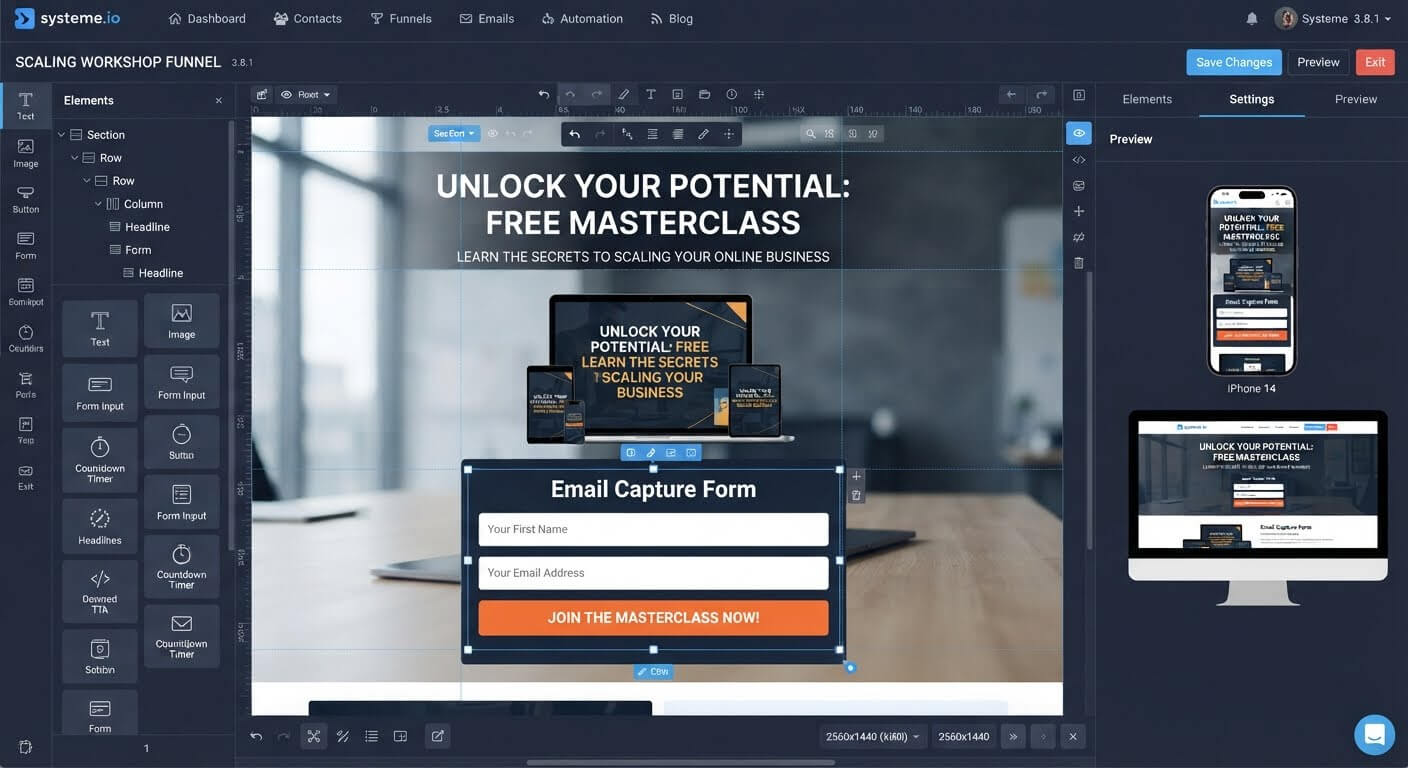
Systeme.io is an all-in-one platform that includes a landing page builder on its free plan. You can build, publish, and collect leads without entering payment details.
No Credit Card to Sign Up
You create an account with your email address. That's it. No card, no trial period, no automatic charges.
The free plan is permanent. You stay on it as long as you want.
Drag-and-Drop Page Editor
Systeme.io's visual editor lets you add headlines, images, forms, and buttons without any coding. You can build a complete page in under an hour.
Built-In Form and Email Capture
Every opt-in is stored in the Systeme.io CRM automatically. You can then trigger welcome emails or tag subscribers for follow-up.
Free Hosting and SSL
Once you publish, the page is live on the web. You can connect a custom domain for free, or use the default Systeme.io URL.
Automation on the Free Plan
When someone submits the form, you can trigger an email sequence automatically. This is normally a premium feature on other platforms.
Best Practices for Free Landing Pages
Keep the Page Focused on One Goal
Every element should push the visitor toward the same action. Remove anything that distracts from that goal.
Use Real Photos When Possible
Stock photos look generic. A real photo of you or your product builds more trust.
Make the Form Short
Every extra field reduces completion rates. Ask for the email address first. Names and phone numbers can come later.
Write Like You Talk
Formal, corporate language feels cold. Write the way you'd explain your offer to a friend.
Common Mistakes to Avoid
Trying to Do Too Much on One Page
A landing page isn't a website. It has one job. Don't add an about section, a blog, or unrelated links.
Using Vague Headlines
"Our Solution Helps You Succeed" says nothing. Be specific. Name the outcome. Name the timeline. Name the audience.
Ignoring Mobile Layout
Most visitors arrive on a phone. Check that your text is readable, buttons are tappable, and the page doesn't scroll sideways.
Forgetting to Test the Form
A broken form loses leads silently. Always submit a test and confirm the email arrives in your CRM.
Frequently Asked Questions
Can I really build a landing page for free without a subscription?
Yes. Platforms like Systeme.io include landing page builders on their free plans. You can build, publish, and collect leads without paying.
Do I need a domain name?
Not strictly. You can use the free URL provided by the platform. A custom domain looks more professional, but it's optional for testing.
How many visitors can my page handle on the free plan?
Systeme.io doesn't cap visitors on the free plan. You can send unlimited traffic to your page.
What happens when I outgrow the free plan?
You upgrade when your business needs more contacts or advanced features. Paid plans start at $27 per month, and you only pay when you choose to.
Conclusion
A landing page doesn't have to cost money. It just has to be clear, focused, and functional.
You can build it in an afternoon. Write a specific headline. Add a short subheadline. Include one form or one button. Publish it. Test it.
Systeme.io gives you everything you need on the free plan. The page builder, the form, the hosting, and the email automation—all included.
Start with one page. Test it. Improve it. Then build the next one.
Your first offer deserves a real landing page. You don't need a subscription to build it.
👉 Build your landing page for free today
Related Reading
Designing asset capture forms without hidden subscription blocks strips all structural friction from your workflow. To map out the rest of your zero-overhead business ecosystem, read my complete roadmap on how to launch a digital product business with zero budget.