Staring at a blank funnel builder with no clue where to start is a special kind of frustrating. You don't need to learn code or watch a ten-hour tutorial—you need a platform that gives you a pre-built structure and lets you drag and drop your way to a live funnel.
Systeme.io is built for exactly that: pick a funnel type, customize the template, connect Stripe or PayPal, and publish. The free plan includes three funnels, so you can test the whole process without a credit card.
👉 Build your first funnel in under two hours for free here
Why This Learning Curve Problem Happens
Most funnel builders assume you already know what a funnel looks like. They hand you a blank canvas and a sidebar full of elements, then expect you to assemble an opt-in page, a thank-you page, an upsell sequence, and an email automation from scratch.
ClickFunnels, for example, is powerful but starts at $97 per month and requires learning its specific interface before you can launch anything . For a non-technical beginner, that combination of cost and complexity creates a wall before the first page is even built.
The root issue is that "funnel builder" can mean anything from a simple two-page opt-in flow to a multi-step sales machine with upsells and downsells. Beginners need the simple version first, with templates that show them what a funnel actually looks like.
Step-by-Step Fix for Building Your First Funnel Without Technical Skills
Step 1: Create a Free Account and Pick a Funnel Type
Sign up at Systeme.io with just an email address—no credit card required. Once inside, click Funnels and then Create.
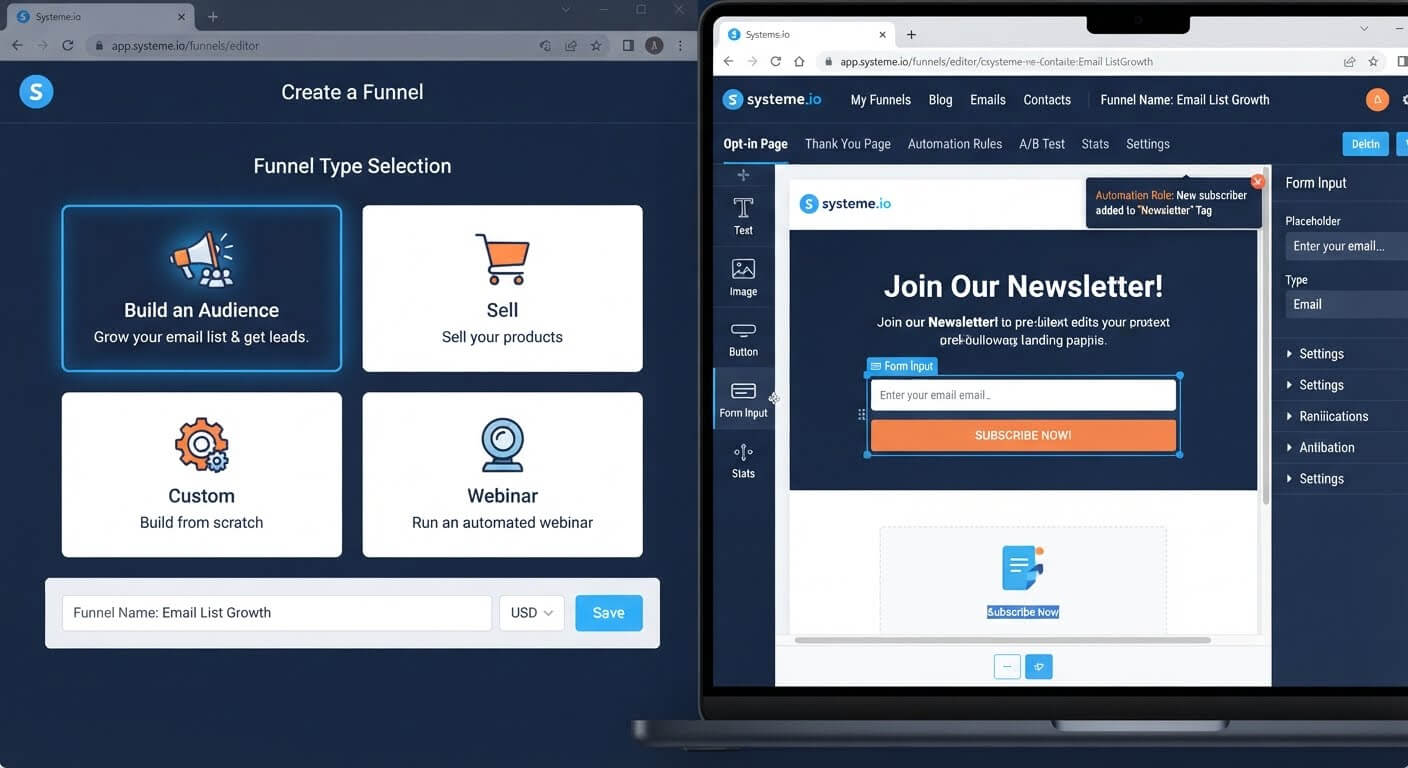
Systeme.io offers four funnel types . For a beginner, the simplest options are:
- Build an Audience: An opt-in page plus a thank-you page. This is the easiest funnel structure and perfect for a lead magnet.
- Sell: A pre-built order form and thank-you page designed for product sales.
Choose "Build an Audience" if you're collecting emails. Choose "Sell" if you're selling a product directly.
Step 2: Use a Template Instead of Starting Blank
After selecting your funnel type, Systeme.io shows you a library of templates. Pick one that roughly matches your offer.
You don't need to design anything from scratch. The template already includes the sections, columns, and elements arranged in a working layout . Your job is to swap the placeholder text and images for your own.
Step 3: Customize with Drag-and-Drop
Click Edit Page to open the visual editor. The interface has three layers: sections (the big blocks), columns (the layout inside sections), and elements (text, images, buttons, forms) .
To change a headline, click it and type. To swap an image, click it and upload a new one. To add a form, drag the form element from the sidebar into a column.
Nothing requires code. If you can edit a document, you can edit a funnel page.
Step 4: Set Up the Form to Collect Emails
Drag a Form element onto your opt-in page. Make sure it includes an email field—that's the minimum required to capture a lead .
Click the form and set the button action to Submit form. This ensures the email address is saved as a contact in your CRM. Then choose where the visitor goes after submitting: usually the next step (your thank-you page) or a custom URL.
Step 5: Connect Email Delivery
Go to Emails and create a sequence for your lead magnet. Add one email that delivers the file or access link. Then go to Automations and create a rule: when someone submits your form, send that email.
This is the part where most beginners get stuck on other platforms—they need a separate email tool and a Zapier connection. Systeme.io includes both, so the form submission triggers the email directly .
Step 6: Test the Entire Funnel
Submit your own form with a real email address. Check that:
- The thank-you page loads
- The delivery email arrives
- Your contact appears in the CRM
Fix any broken links or missing emails before sending traffic.
👉 Start building your first funnel with a template for free here
The Easiest Way to Avoid This Issue Moving Forward
The simplest way to avoid technical overwhelm is to choose a platform where the funnel, email, and checkout are already connected.
Systeme.io's free plan includes three funnels, 2,000 contacts, and unlimited email sends. You can build a lead capture funnel, connect it to an email sequence, and publish it without paying or installing anything.
If you outgrow the free limits, the Startup plan is $17 per month. Compare that to ClickFunnels' $97 entry price for the funnel builder alone . For a beginner testing a first offer, the free tier removes the financial risk entirely.
Common Mistakes to Avoid
Starting with a Complex Funnel Type
The "Custom" funnel type gives you a blank canvas. Beginners should avoid it. Start with "Build an Audience" or "Sell" so the structure is already there .
Skipping the Form Button Action
If you add a form but forget to set the button action to "Submit form," nothing happens when someone clicks. The email address isn't saved, and the automation never fires .
Designing Before Testing
Don't spend hours perfecting colors and fonts before confirming the form works. Build the functional flow first, test it, then make it pretty.
Forgetting to Connect Email
A funnel that collects emails but doesn't send anything is a dead end. Set up at least one delivery email before publishing.
Frequently Asked Questions
Do I need technical skills to use Systeme.io?
No. The editor is drag-and-drop. You pick a template, click on text to edit it, and drag elements into place. No coding is required.
Is the free plan really enough to build a working funnel?
Yes. The free plan includes three funnels, form submission, email automation, and checkout. You can build a complete opt-in or sales funnel without paying.
How long does it take to build a first funnel?
Most beginners can publish a simple two-page funnel in under two hours. The template provides the structure, so you're mainly swapping text and connecting your email sequence.
Can I sell products on the free plan?
Yes. Connect Stripe or PayPal and add a product to your checkout step. The free plan charges no platform transaction fees.
Conclusion
Building a sales funnel doesn't require technical skill or a $97 monthly subscription. It requires a template, a form, and an email sequence—all of which can live in one platform.
Systeme.io gives you the structure. Pick a funnel type, customize the template, set the form to submit, and connect your delivery email. Test it, publish it, and you have a working funnel.
Start with the simplest version. Add complexity only after the first funnel converts.
👉 Build your first sales funnel for free today
Related Reading
Choosing a lightweight, visual builder keeps your design process stress-free. If you are currently dealing with a heavy dashboard setup that hurts performance, see my analysis on WordPress Plugins Making Site Slow: Alternatives for Sales Funnels.